Hi @ Cammus Users!
Using the great Cammus C5 and since recently, the awesome Cammus C12 Wheel, I did get into some challenges setting up the wheels for driving Le mans Ultimate.
If you are having troubles, too, Take a look at this problems and troubleshootings:
- In Wheel Base settings under Assistance, disable “Hands-off protection”, LMU cannot work properly with that!
- Also, FFB Inversion is needed. In Cammus Desktop SW, mark it as default, but in LMU FFB settings, invert it

- Do not connect wheel to USB Hub!: LMU struggles with wheels connected to the pc through an usb hub, instead. Connect the wheel directly to your PC USB Plug! I had random wheel disconnects after 20min and tremendous high oscilations, both in slow and fast corners! Connecting the wheels directly into my PC USB resolved both of that!
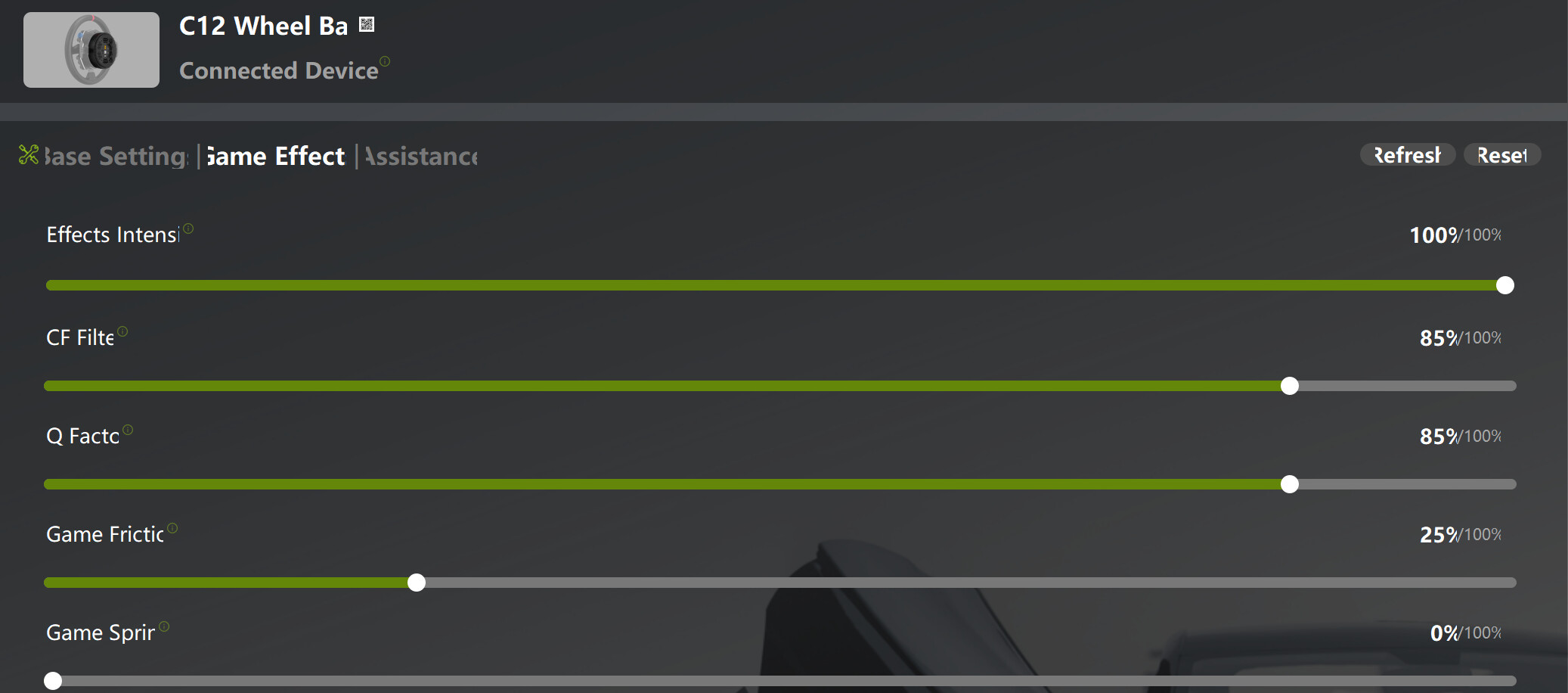
- Permanent Clipping: LMU has a distinct ffb software, that works a bit different than acc or Iracing. To avoid clipping, set the ingame FFB Force at 70 or less % for the Cammus C12 to avoid internal clipping. For the Cammus C5 with less newtonmeters, do not try to avoid clipping at any means, because usually high ffb force is great for handling the cars. For my C5, I am using 80% ingame, and 100% FFB from Cammus Desktop Software Side.
- SimHub: I am using simhub to enable bass shakers. the RF2 Telemetry plugin seems to work flawelessly with Cammus C5 and C12, make sure to follow above points!
My Settings are as followers: