CAMMUS COMMUNITY GIVEAWAY: Game Settings Challenge 2026

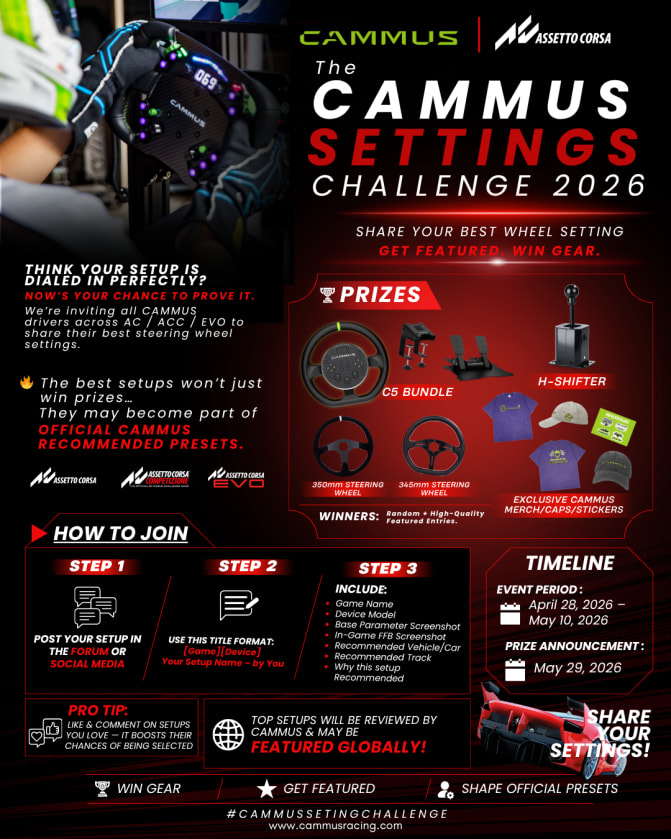
:bullseye:CAMMUS × Assetto Corsa Community Settings Challenge 2026

Think your setup is perfectly dialed in?
Now’s your chance to prove it.

We’re inviting all CAMMUS users to share their best steering wheel settings across the Assetto Corsa series — and compete for prizes, recognition, and the chance to shape official CAMMUS presets.


:joystick: Event Theme

CAMMUS × Assetto Corsa Series Community Parameter Co-creation Challenge

Supported Games:

  • Assetto Corsa (AC)
  • Assetto Corsa Competizione (ACC)
  • Assetto Corsa EVO

:date: Event Timeline

Event Period: April 28, 2026 – May 24, 2026
Winners Announced: May 29, 2026


:trophy: Prizes

  • CAMMUS C5 3-in-1 Bundle
  • CAMMUS H-Shifter
  • CAMMUS 350mm/345mm Steering Wheels + Logo Badge
  • CAMMUS T-shirt
  • CAMMUS Cap
  • CAMMUS Stickers

:game_die: Winners will be selected randomly, with the number of winners determined based on total participation.
:envelope_with_arrow: The winners’ list will be public after the event.


:pushpin: How to Participate

  1. Reply directly to this thread with your setup submission
  2. Follow the required title and content format (see Reply #2 below)
  3. Engage with other participants by liking and commenting

:light_bulb: Active participation (likes/comments) helps increase visibility and may improve your chances of being selected.


:bar_chart: What to Submit

Share your best steering wheel settings, including:

  • Base parameters
  • In-game FFB settings
  • Recommended cars & tracks
  • Your reasoning behind the setup

:glowing_star: Selection & Recognition

We will evaluate entries based on:

  • Popularity (likes & discussion)
  • Quality and clarity
  • Practical value
  • Internal review by CAMMUS team

Selected high-quality setups may:

:white_check_mark: Become part of CAMMUS Official Recommended Presets
:white_check_mark: Be featured on:

  • CAMMUS Official Website
  • CAMMUS Social Media
  • New User Setup Guides

:fire: Why Join?

  • Win real hardware
  • Get featured globally
  • Help shape the CAMMUS ecosystem
  • Discover and share top-tier setups with the community

:megaphone: Final Notes

Please ensure your submission follows the required format
Only submissions under this thread will be considered
CAMMUS reserves the right to use submitted content for promotional purposes

All final interpretation rights belong to CAMMUS.

8 Likes

:page_facing_up: Submission Format (Copy & Use)

Title Format:
[Game][Device] Setup Name – by Username

Example:
[ACC][C5] Smooth GT3 Beginner Setup – by Alex


:chequered_flag: Content Format:

Game Name:

Device Model:

Base Parameter Screenshot:
(Attach image)

In-game FFB Screenshot:
(Attach image)

Recommended Vehicle / Car Category:

Recommended Track:

Why do you recommend these settings?


:warning: Notes:

Please keep your format consistent
Clear explanations increase your chances of being featured
High-quality screenshots are strongly recommended

9 Likes

:loudspeaker: If you are unable to reply to this thread, you may create a new topic with the event taggiveaways game and follow the required submission format to participate.

3 Likes

CAMMUS COMMUNITY GIVEAWAY: Game Settings Challenge 2026 Entry

Game Name: Assetto Corsa competizione

Device Model: Cammus C12

Base Parameter Screenshot:
(Attach image)

In-game FFB Screenshot:
(Attach image)

Recommended Vehicle / Car Category: GT3 - Mclaren

Recommended Track: Spa

Why do you recommend these settings?
Background: Sim racing around 18 months now. >1000 hours between mostly ACC / LMU. Pace wise, I’m around 1% of the aliens so no pro by any means but a reasonably high level driver with many hours spent tweaking the C12 to get maximum feel and response to translate into pace and consistency. Best lap round spa is in the high 2:16’s (hotlap, not race pace).

I use pretty much the same Cammus setting across all titles, tweaking damping and intertia accordingly.

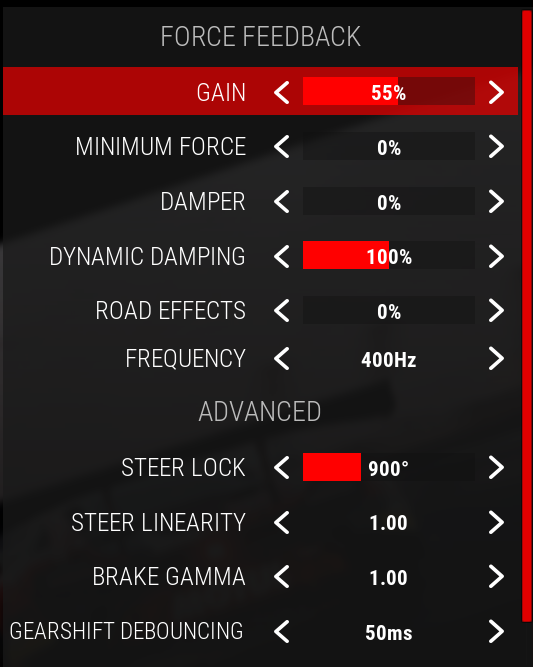
In game - I run around 55% FFB. I find I have no clipping at this setting and get plenty of feedback/strength in the wheel. Some might like to run this higher, but if I’m racing 1-2 hours at higher than this it can get tiring.

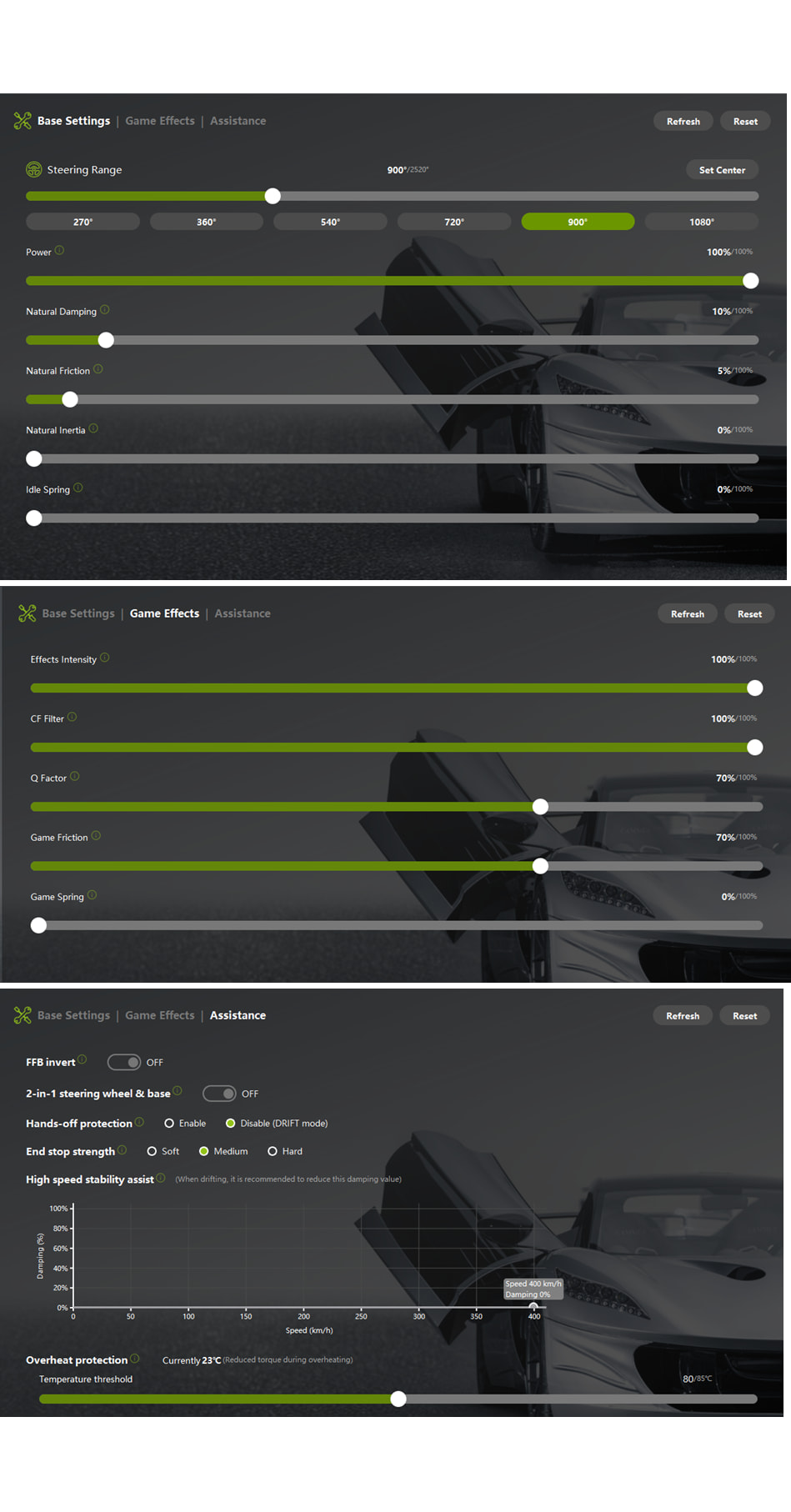
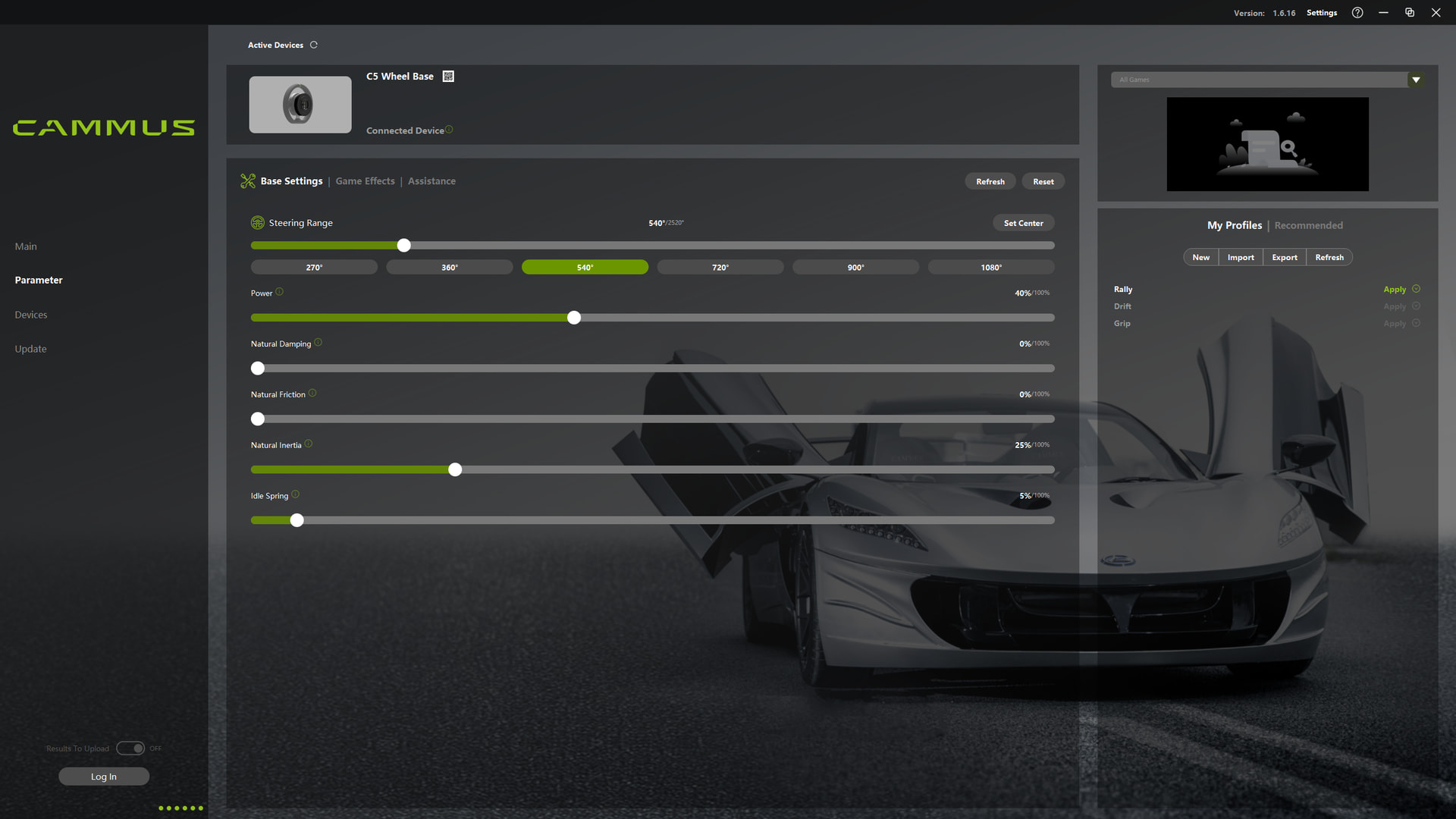
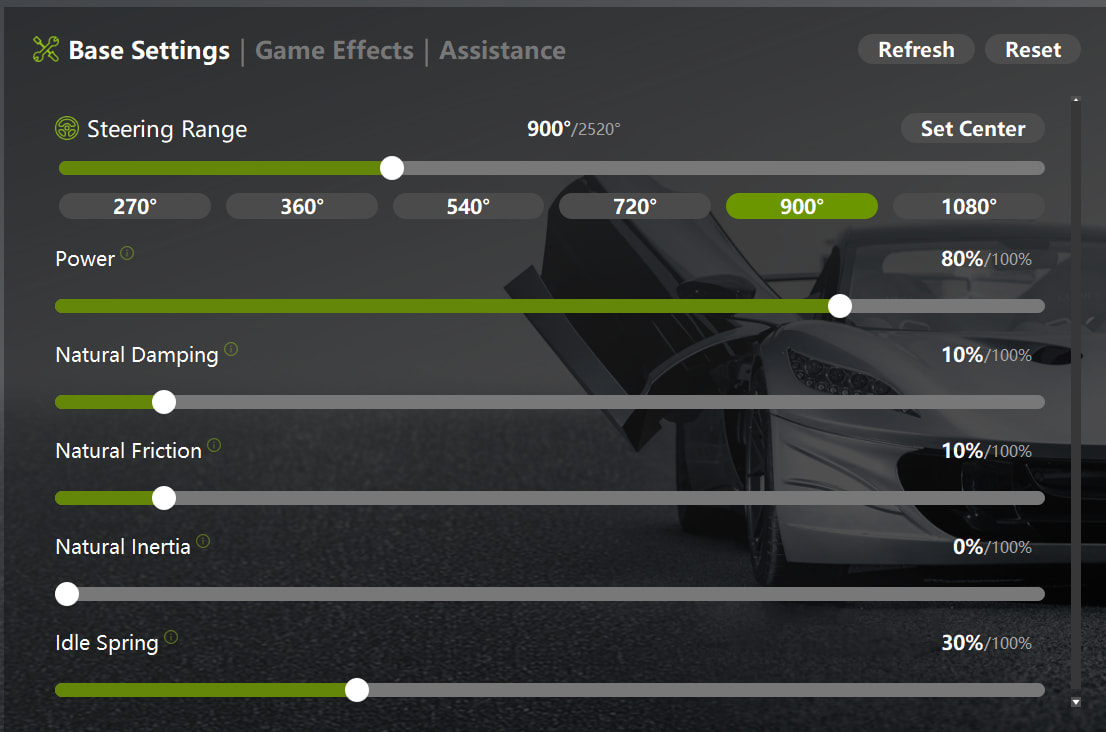
Cammus settings:
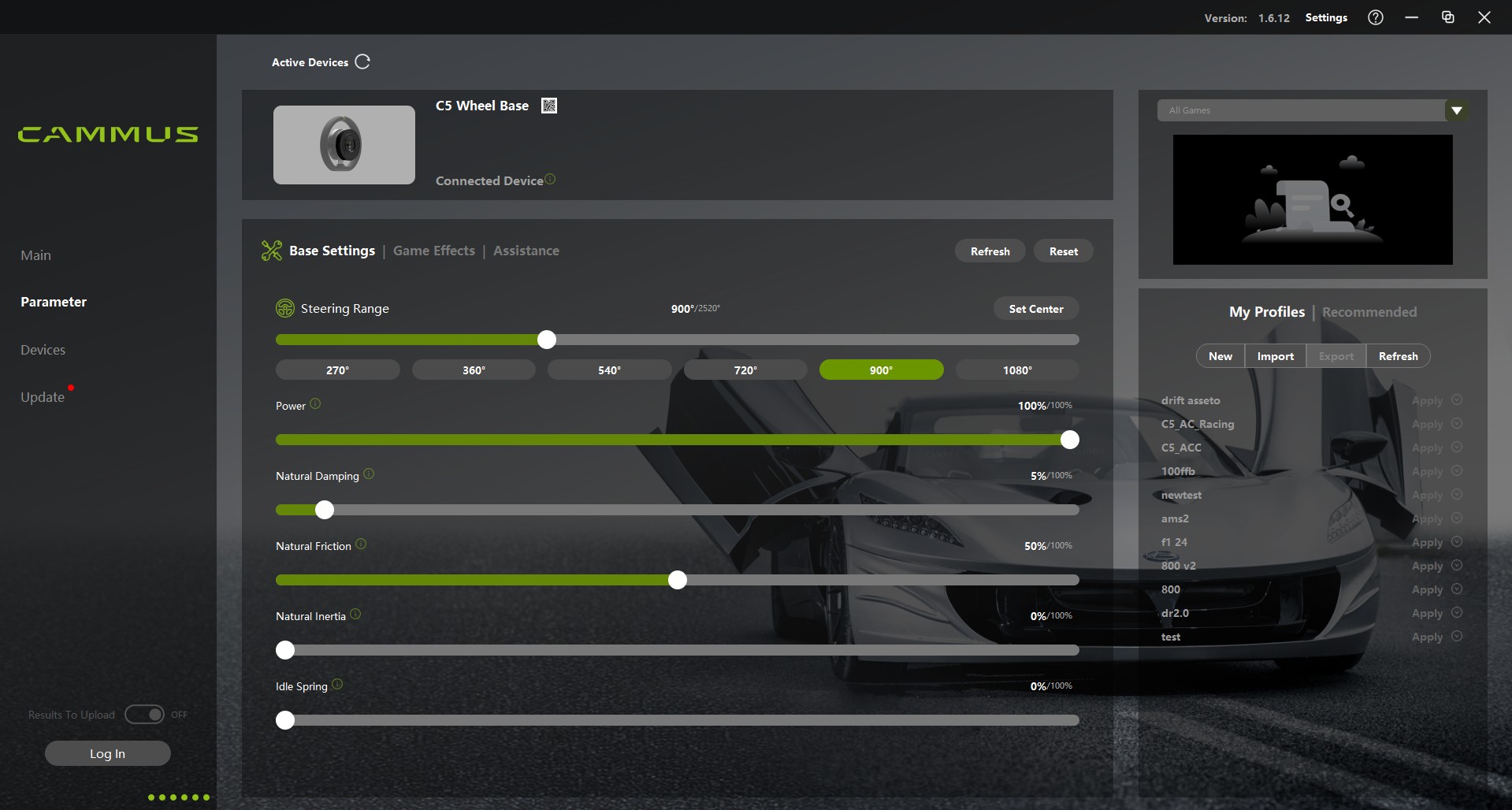
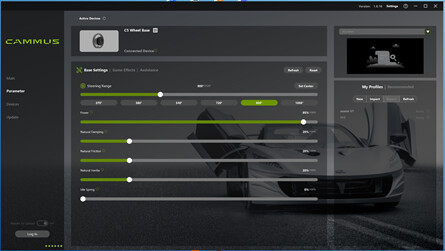
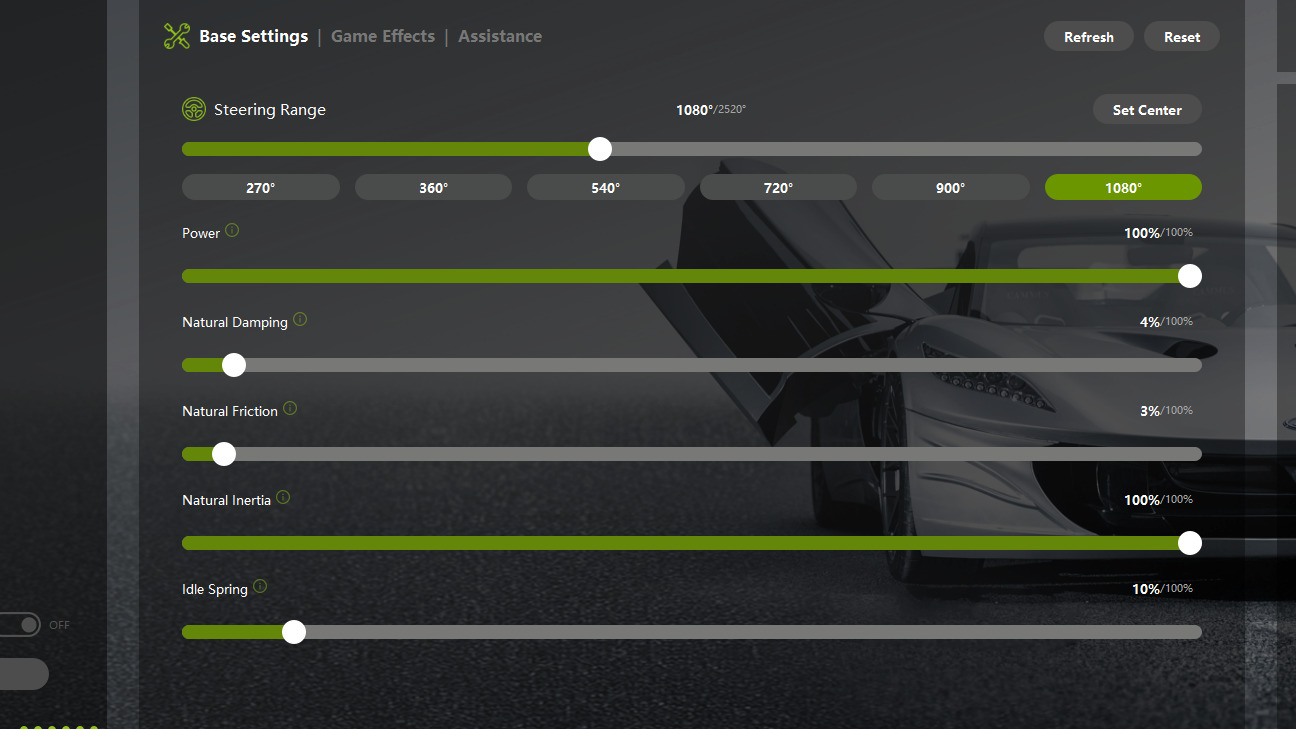
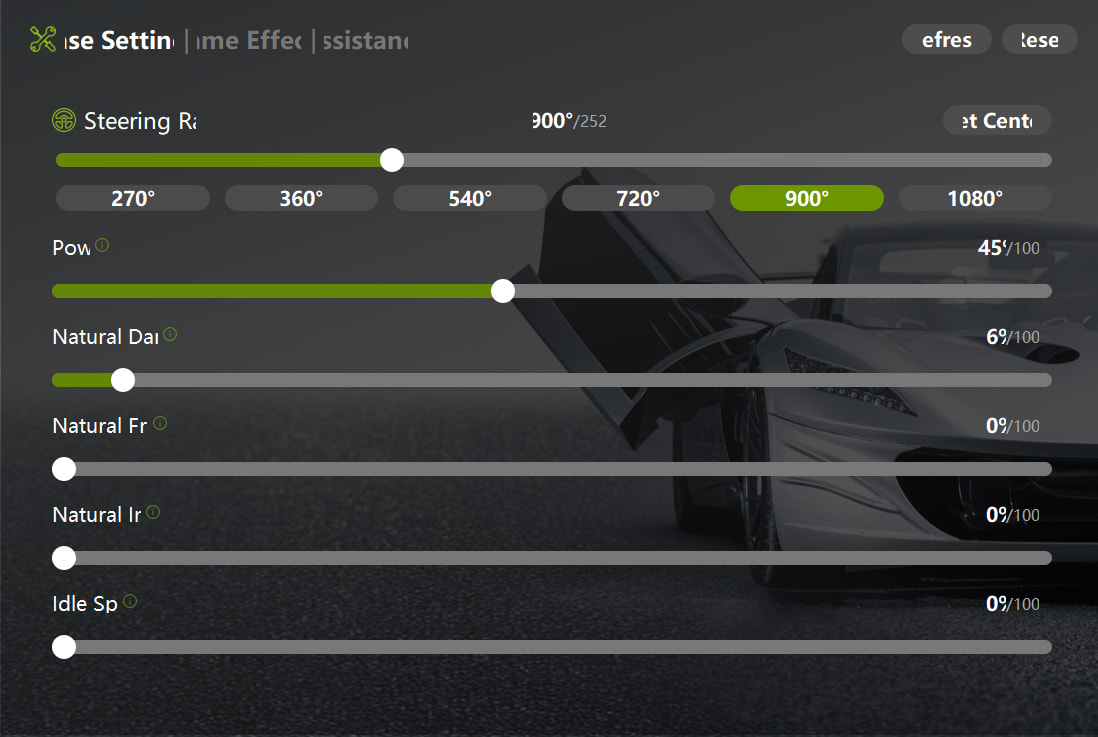
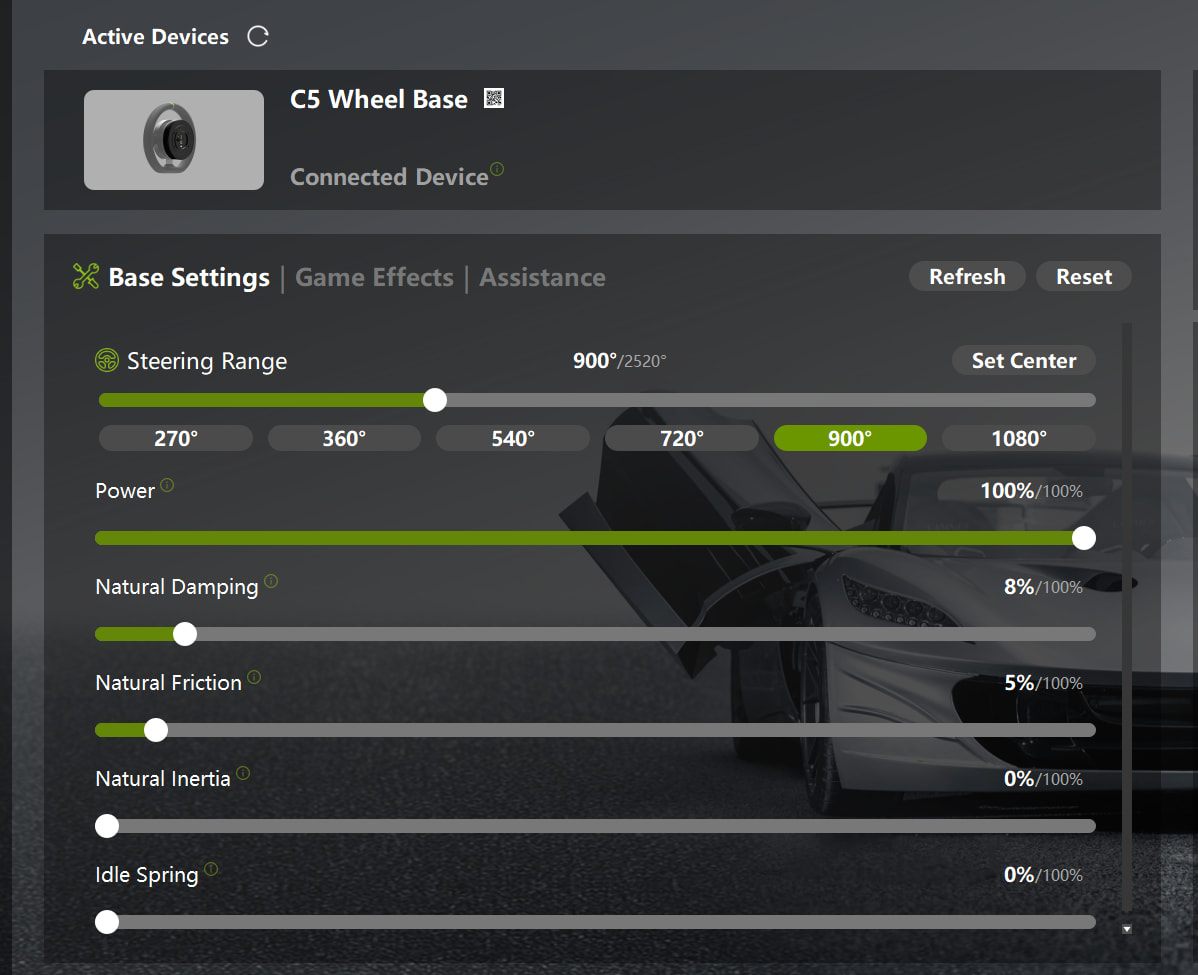
Steering range: 900 as standard.
Power: Always set to 100%, reduce in game FFB gain accordingly.
Damping: I liked to feel as much response as possible. Preference is 10%, no higher.
Natural Friction: Previously used to run 0% but like to feel some weight with the wheel when it’s in the central position, 5% seems the sweet spot.
Natural inertia: 0% usually, 10% gives a natural feel to the wheel when straightening up in other cars/games
Idle Spring: 0% - shouldn’t be needed.

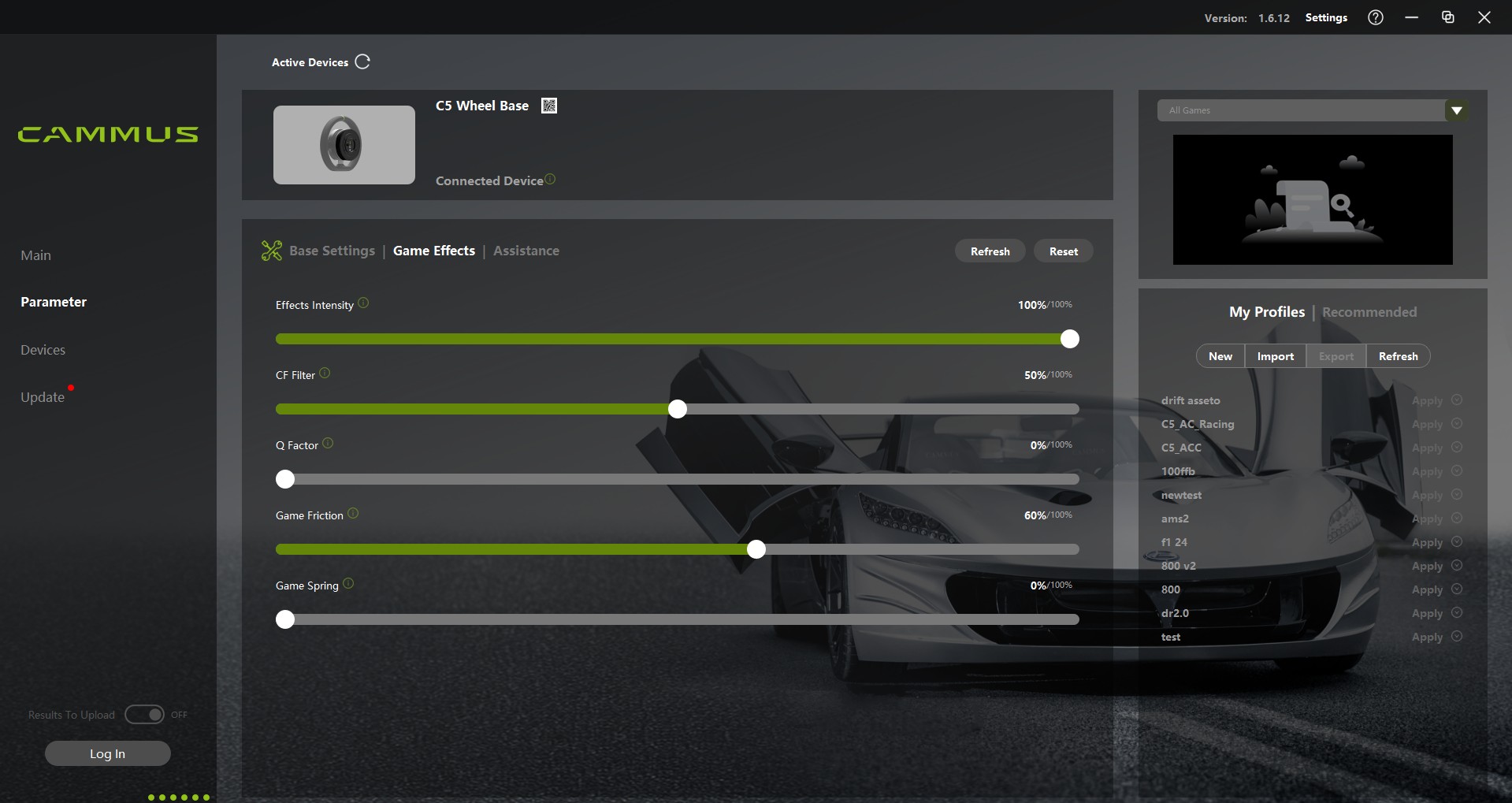
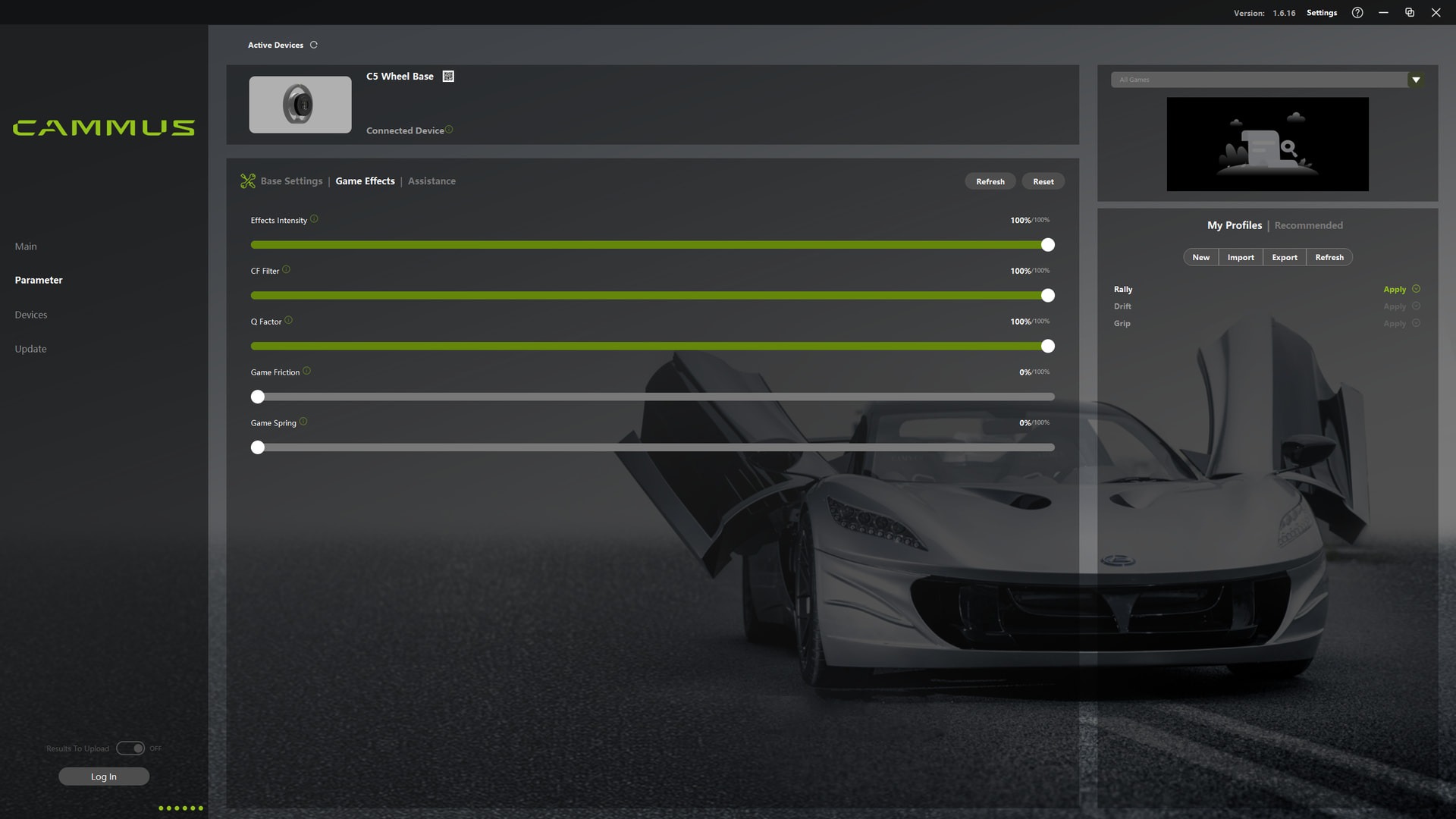
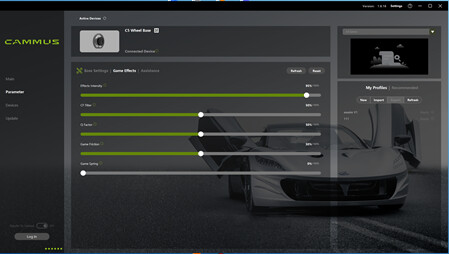
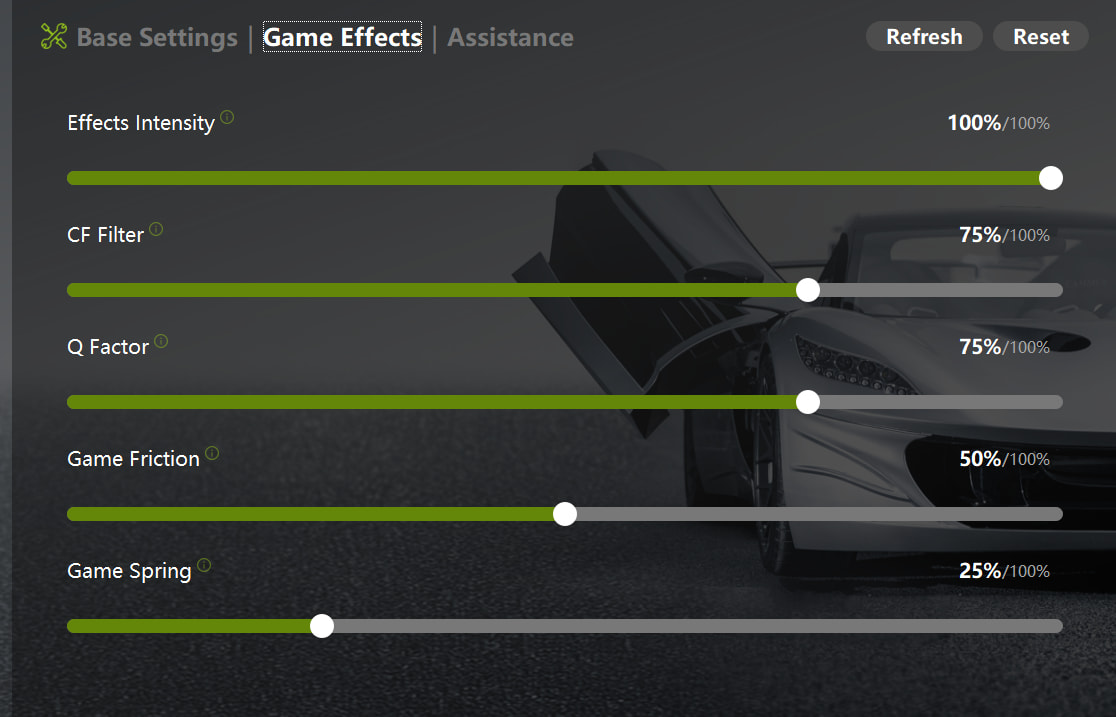
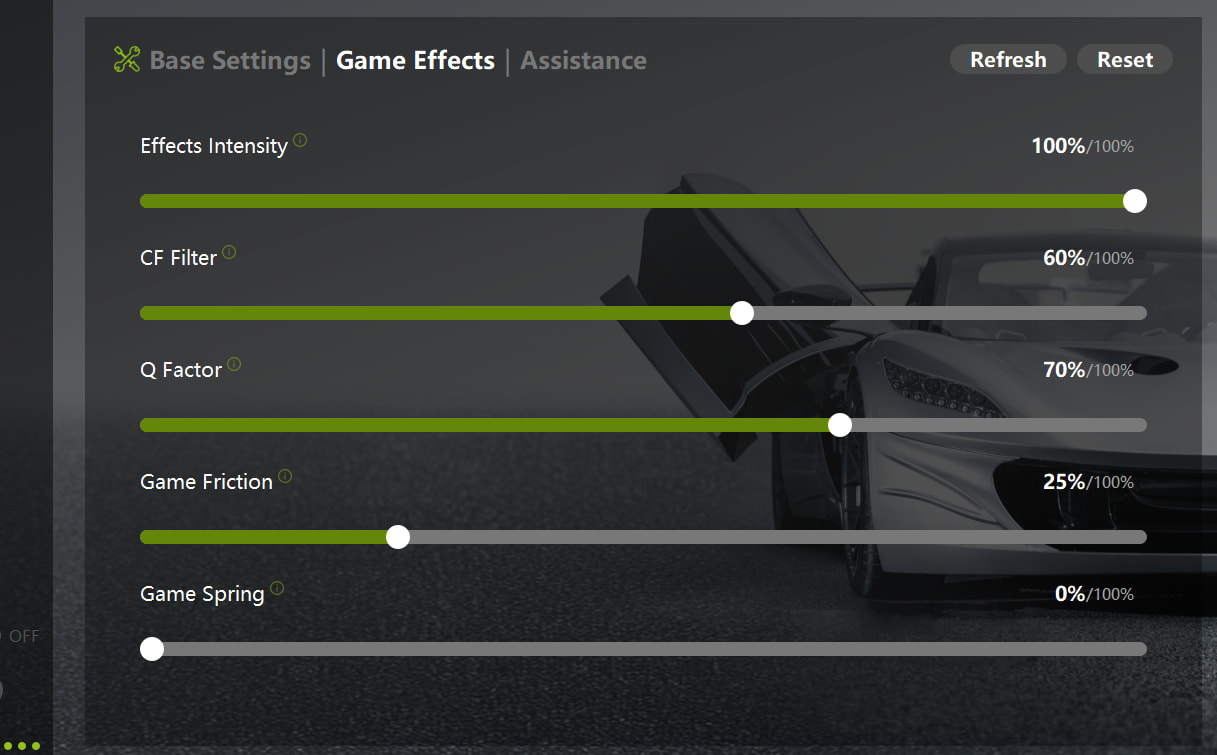
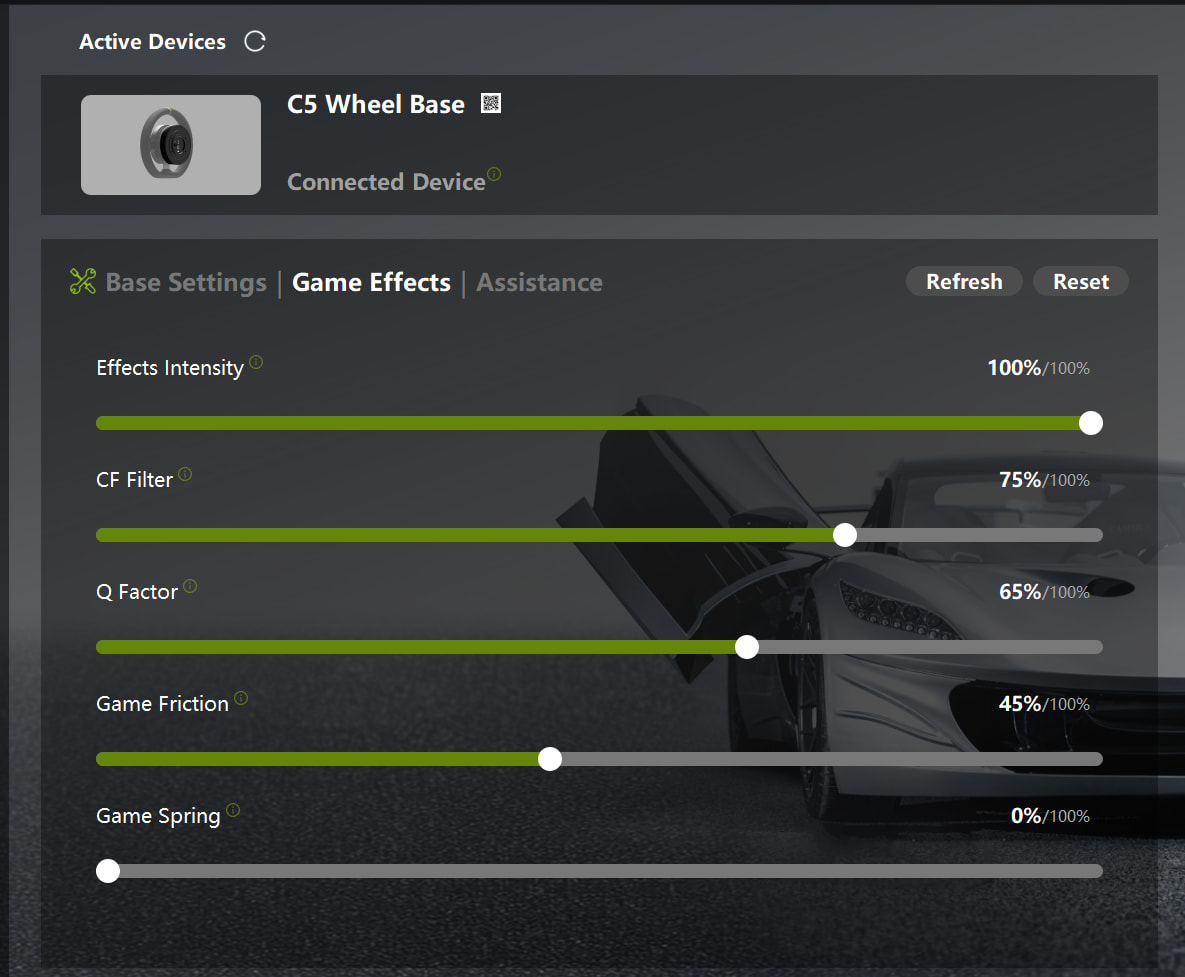
Effects Intensity: 100%, of course! Maximum feel of the road
CF Filter: Basically controls how much detail is allowed through, 100% for me.
Q Factor: As I understand it, this filters the CF filter and I’ve found this at around 70% tightens what the CF filter is doing. Too low = too much oscillation through the wheel and less control.
Game Friction: This relates to the friction of the wheels on the road, do not mistake it for acting like Natural Friction above which is a constant force. It increases the wheel weight when understeering, helps you to find the limit and know when you’re going over it/scrubbing the tyres. Again, 70% is the sweet spot for me.
Game Spring: Not required, let the FFB do that work.

I hope someone finds this helpful!

3 Likes

Title:
[AC][DDWB15Nm] ML Drift Bible x Roki-Tama Setup – ML Drift Bible​:blush:

Game Name:
Assetto Corsa using Content Manager and CSP​:index_pointing_up:

Device Model:
CAMMUS DDWB15Nm​:tada:

Basic Parameter Screenshots:
My full settings are also published on my website below.

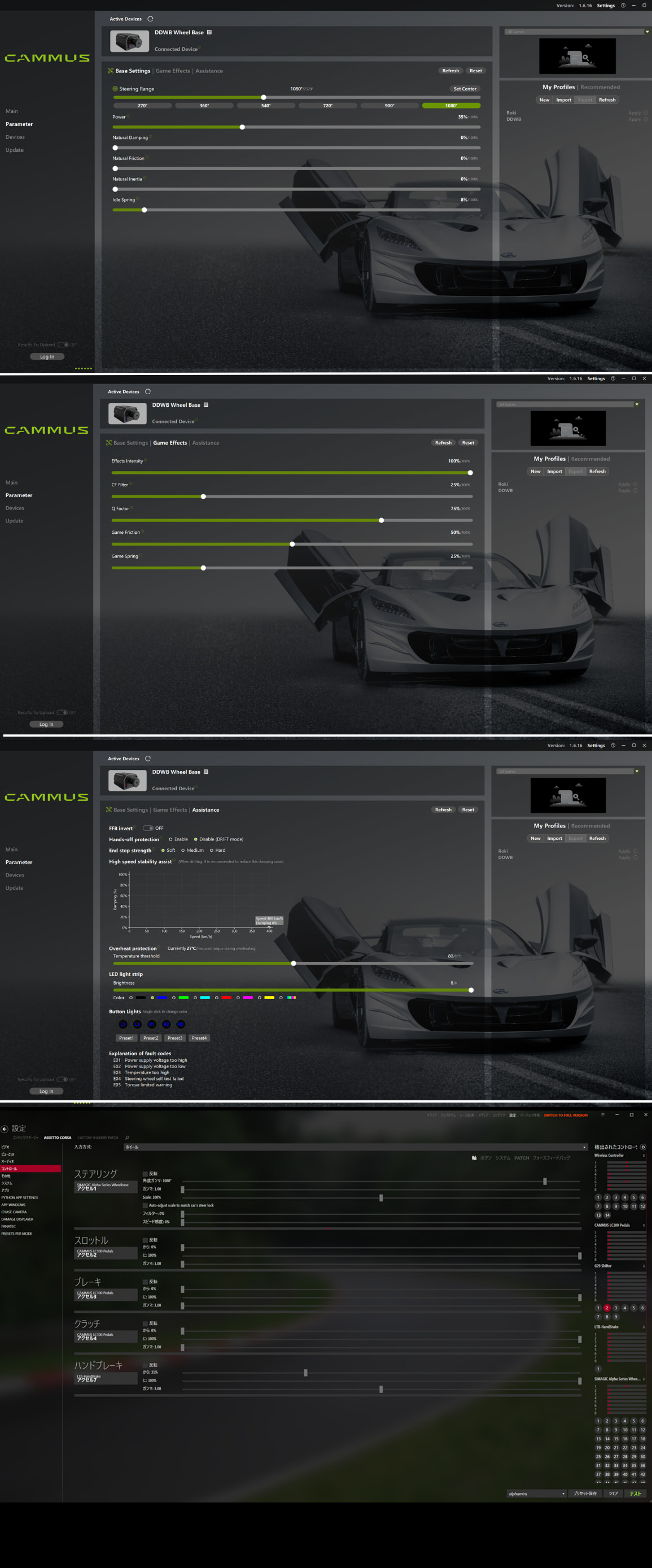
①CAMMUS Firmware Manager > Parameter > Base Settings
Steering Range: 1080 degrees
Power: 35 percent
Natural Damping: 0 percent
Natural Friction: 0 percent
Natural Inertia: 0 percent
Idle Spring: 7 to 8 percent

②CAMMUS Firmware Manager > Parameter > Game Effects
Effects Intensity: 100 percent
CF Filter: 25 percent
Q Factor: 75 percent
Game Friction: 50 percent
Game Spring: 25 percent

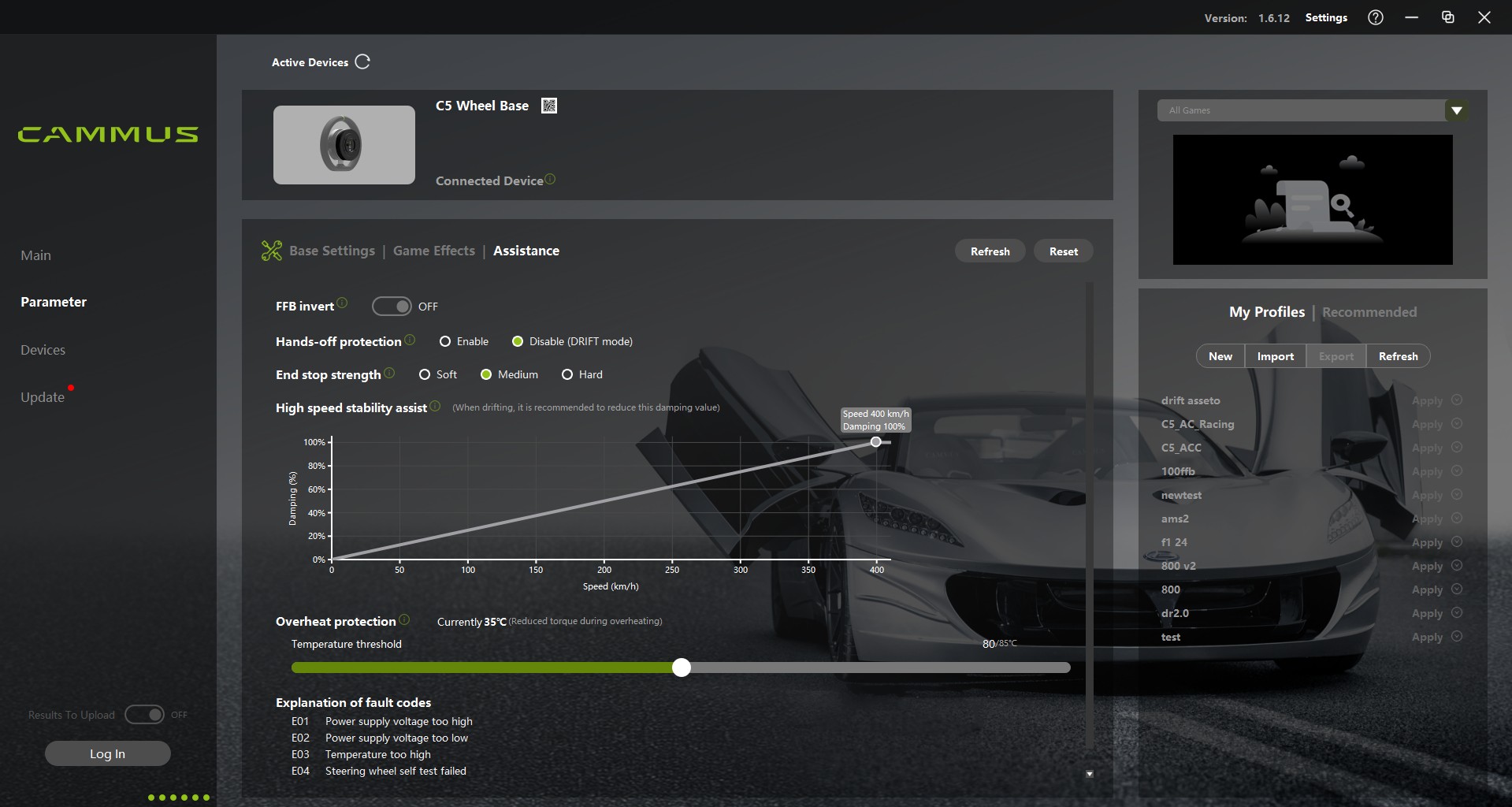
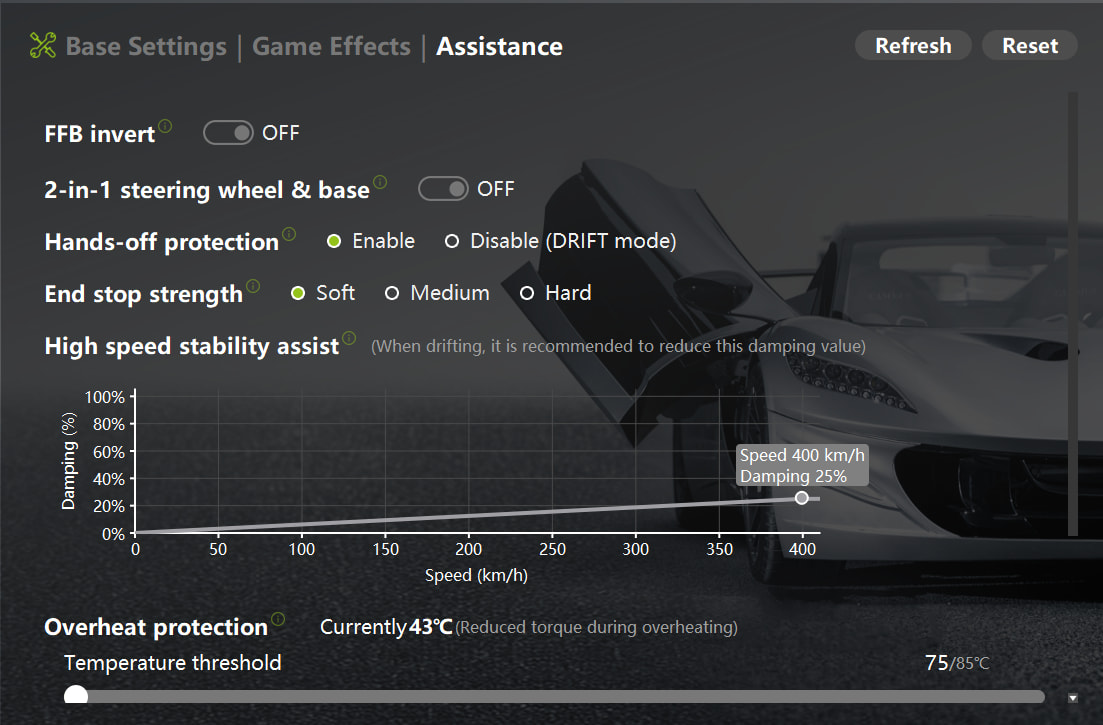
③CAMMUS Firmware Manager > Parameter > Assistance
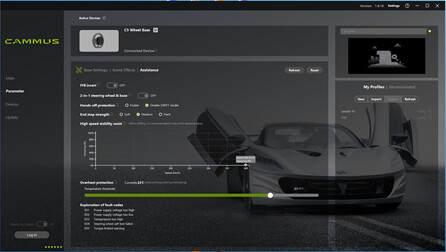
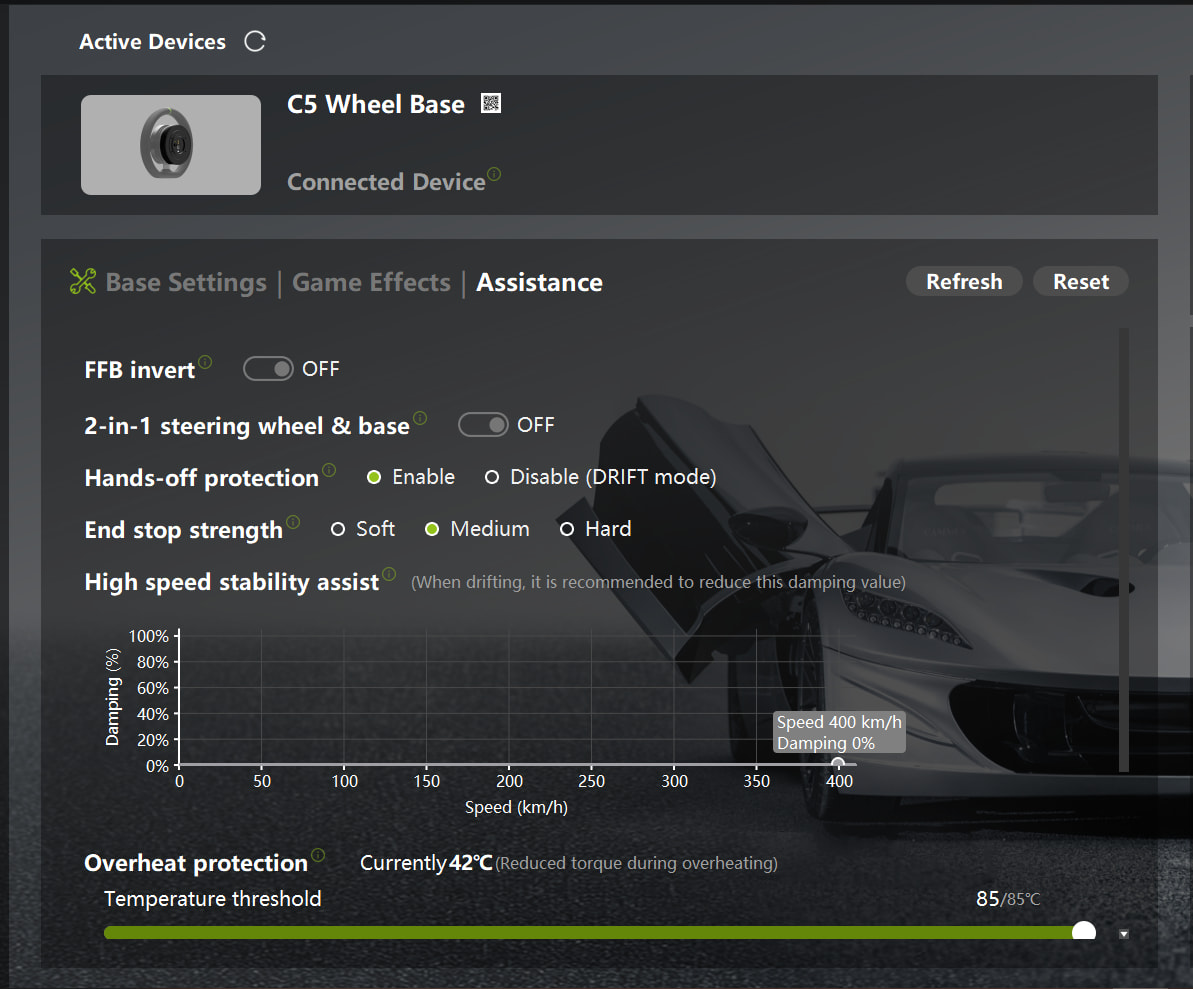
FFB Invert: OFF
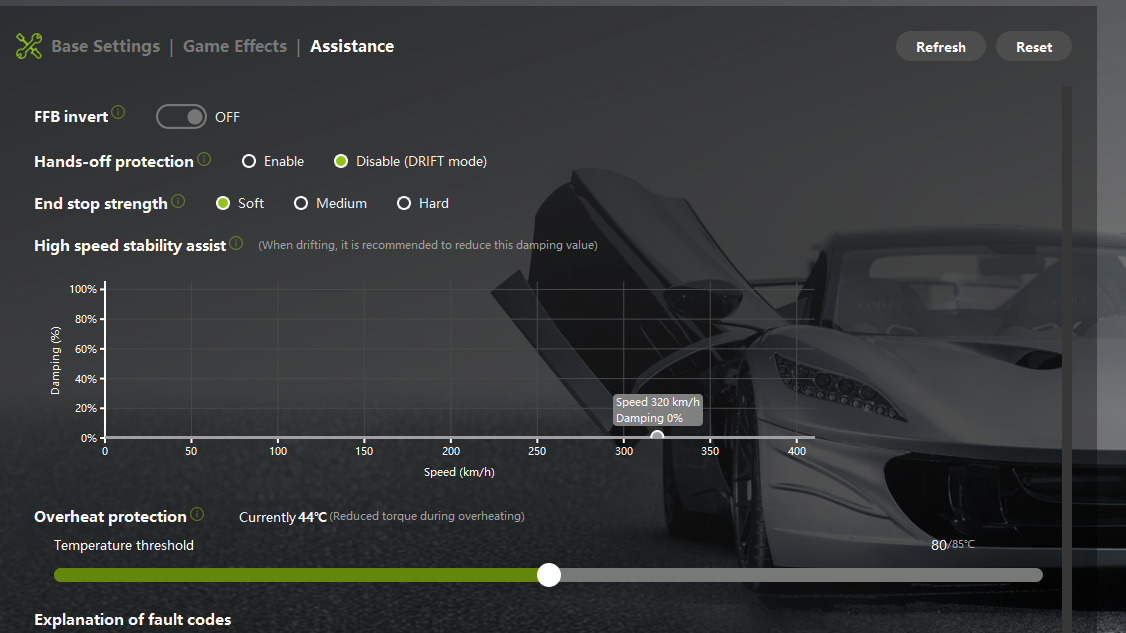
Hands-off protection: Disable, Drift mode
End stop strength: Soft
High speed stability assist: all 0
Overheat protection: 27 to 34 degrees Celsius

④In-game FFB Screenshot:
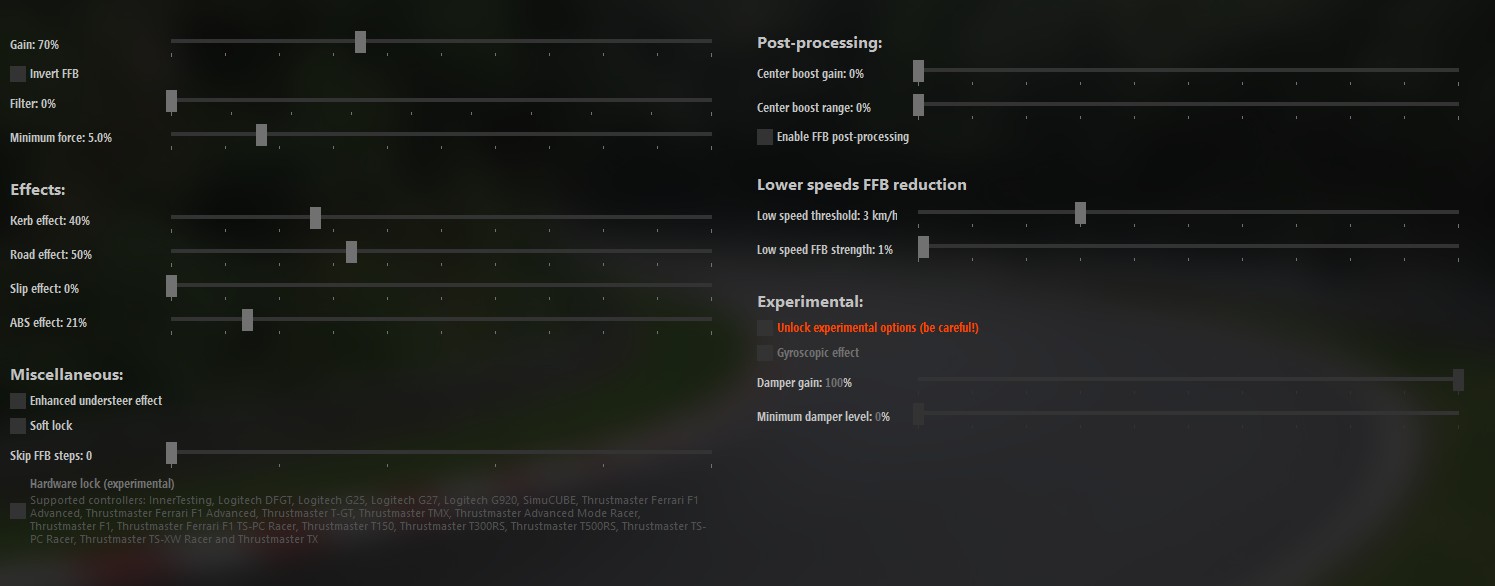
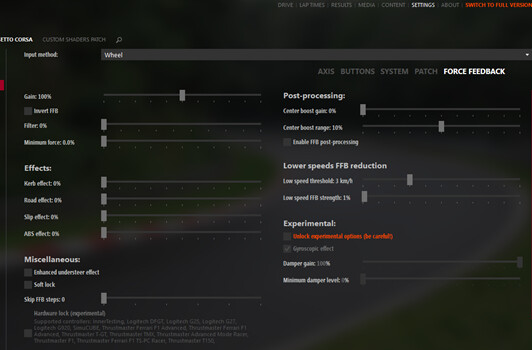
Assetto Corsa within Content Manager > Settings > Assetto Corsa > Force Feedback
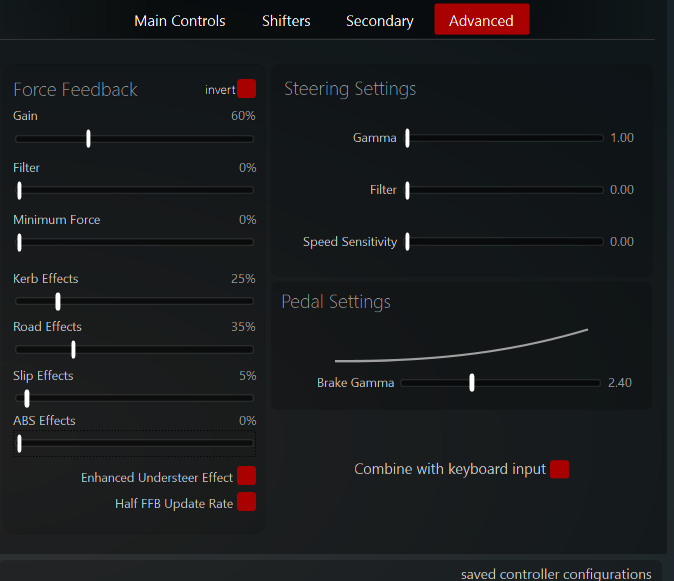
Gain: 80 percent
All other sliders set to 0

:sparkles:Recommended Car / Category::sparkles:
Toyota AE86, specifically the ML86Trueno mod. This is a CarMOD that recreates the Toge touge street racing scene from early 1990s Japan.

Recommended Track:
KR Haruna Downhill, a touge mountain pass stage.:rainbow:

Why do you recommend these settings?This setup is designed to use the high torque direct drive of the CAMMUS DDWB15Nm while focusing on realistic steering behavior rather than a game-like feel. My goal is a proper racing simulator experience.

I focused on three key points.First, cleaning up the information around the steering center position to prevent losing control during tiny steering inputs.

Second, balancing the counter steering behaviour in drift so that it reacts without delay but also does not feel wild or twitchy.

Third, creating a strong sense of road surface details including bumps, load loss, and tyre slip. This helps the driver find a natural rhythm when driving on a touge course.

The result is not just a high strength FFB preset. Instead it is designed so the driver can maintain the feeling of cornering through weight transfer.

Thank you.

6 Likes

Game Name: Assetto Corsa

Device Model: Cammus C5

Base Parameter Screenshot:

In-game FFB Screenshot:

Recommended Vehicle / Car Category: I use this setup with every vehicle, but mostly GT3

Recommended Track: Any track, just use different in game setups

Why do you recommend these settings?
Basically tuned for a balance between detail, stability, and controllability on a low-to-mid torque direct drive base like the CAMMUS C5.

I’d recommend this settings because the C5 only has around 5Nm torque, so if you overuse damping/friction/inertia, the wheel starts feeling “dead” or sluggish instead of detailed.

Steering Range — 900°

Why:

  • Most sims auto-match steering lock.

  • Gives natural road-car steering.

  • Prevents twitchy response in GT/street cars.

Power — 100%

  • You want the wheelbase delivering full dynamic range.

  • Reducing power in software reduces detail and clipping headroom.

Natural Damping — 5%

Very low damping is good for Assetto Corsa.

  • Damping stabilizes oscillation.

  • Too much kills road texture and slip detail.

  • AC already have internal damping.

  • Removes wheel shaking on straights.

  • Keeps steering responsive.

Natural Inertia — 0%

  • Inertia adds virtual wheel weight.

  • Too much slows countersteering.

  • Makes transitions sluggish.

Idle Spring — 0%

  • Modern sims already generate self-aligning torque.

  • Idle spring adds fake centering force.

  • Can fight the game’s real physics.

This is my settings mostly for all sim racing games, thank you!

5 Likes

[AC] [C5] Hillclimb Tarmac Rally - by Luka Martin

Game Name: Assetto Corsa (AC)

Device Model: Cammus C5

Base Parameter Screenshot:

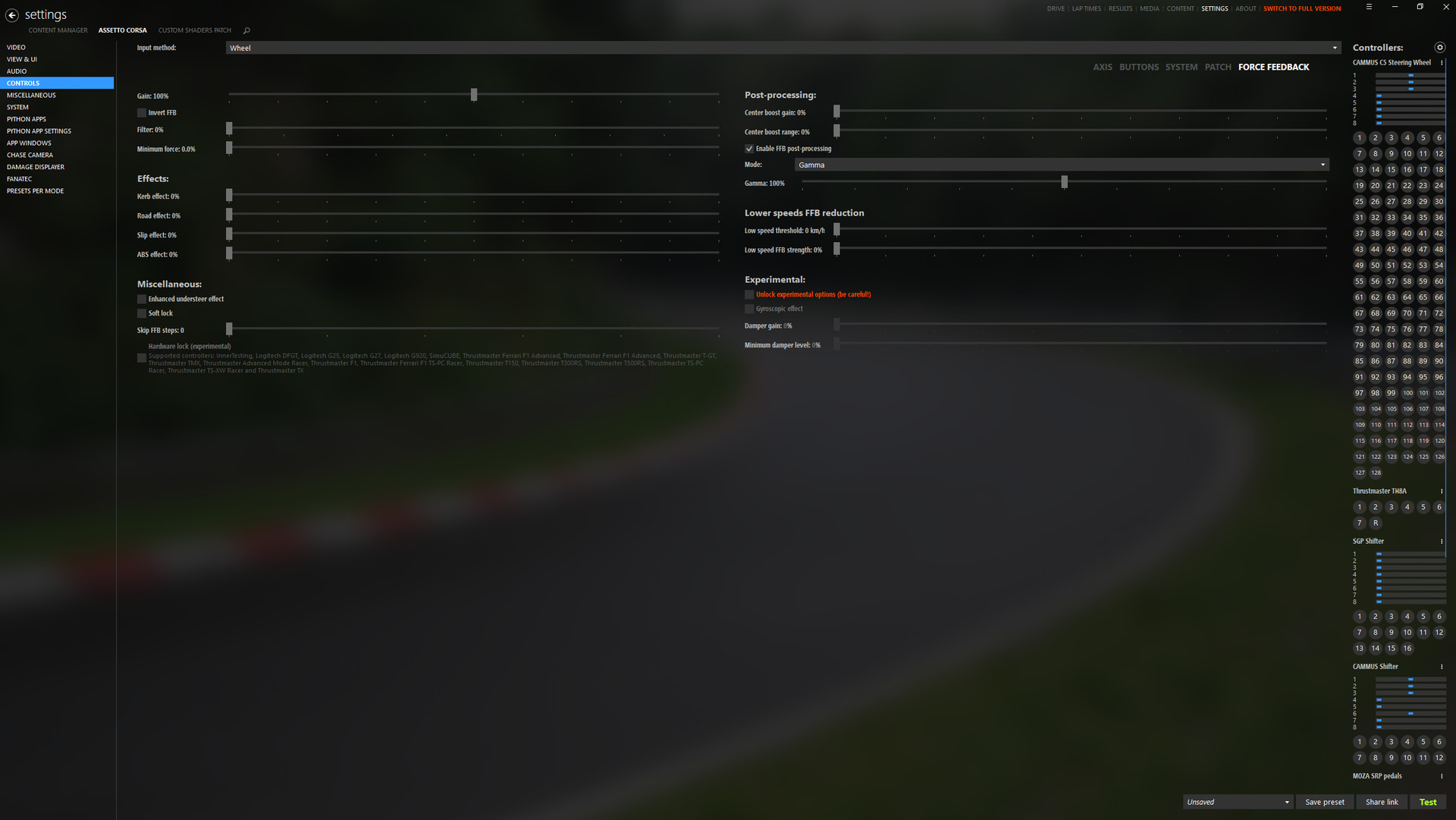
In-game FFB Screenshot:

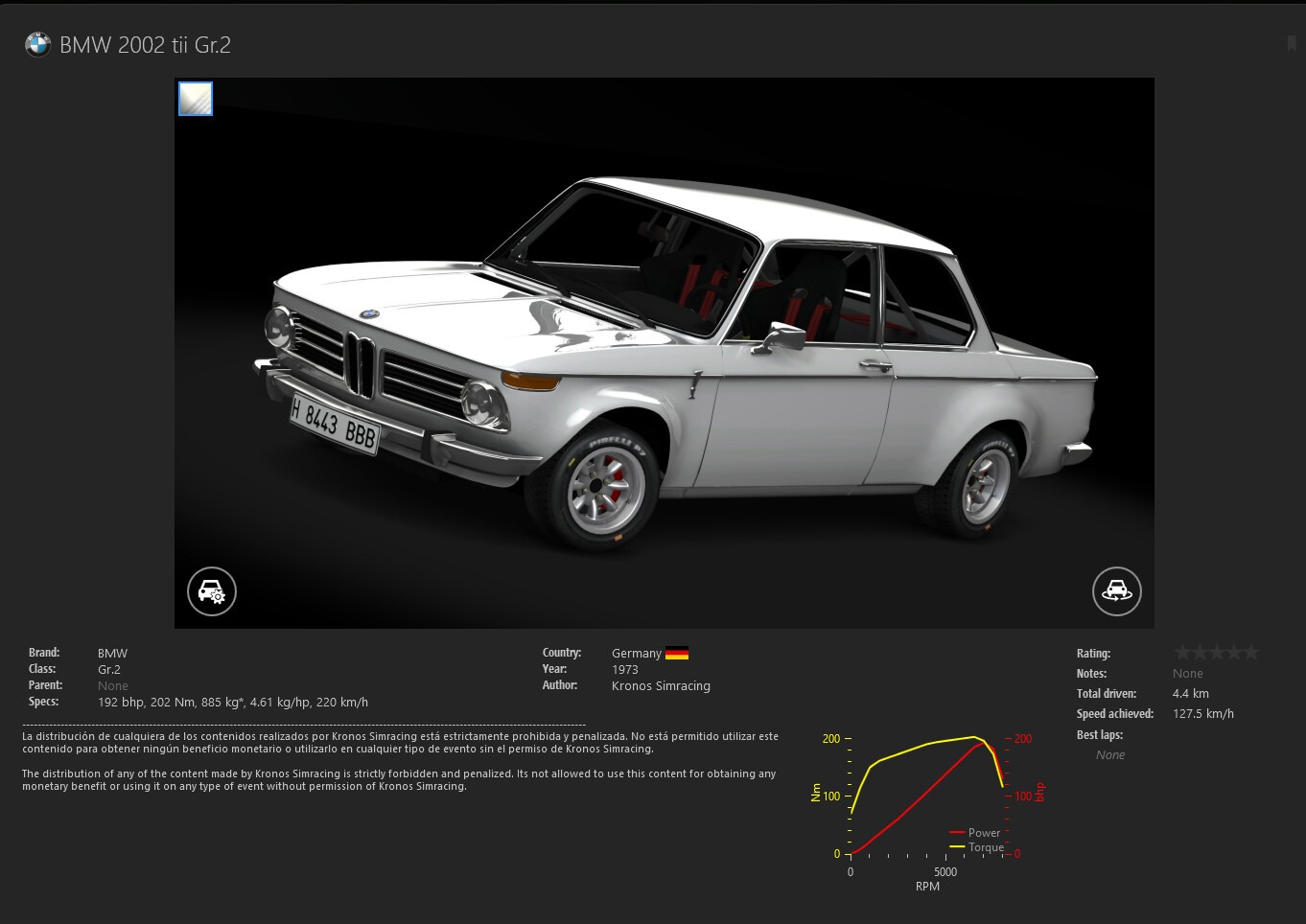
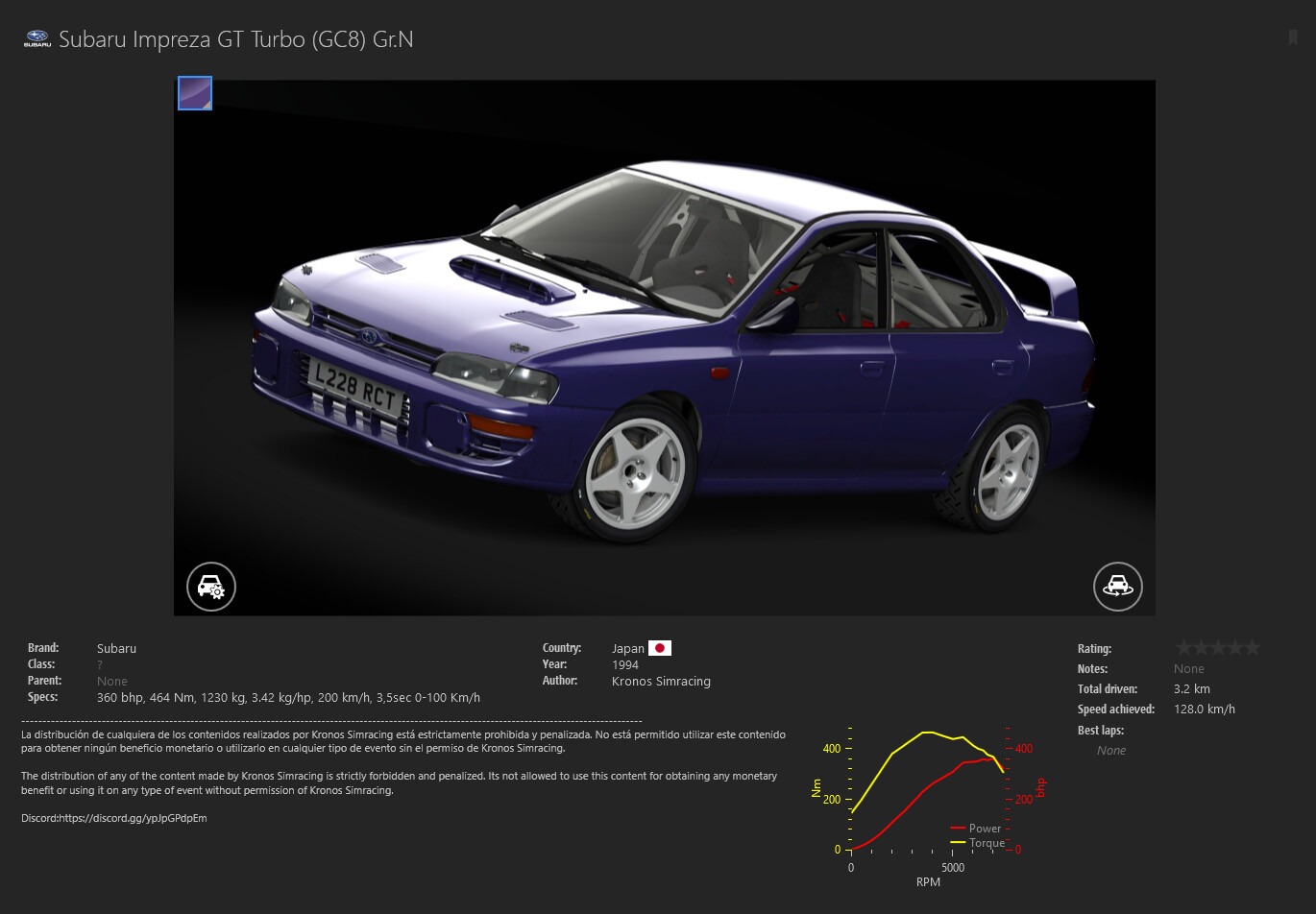
Recommended Vehicle / Car Category: BMW 2002 tii Gr.2 and Subaru Impreza GT Turbo (GC8) Gr.N (both by Kronos SimRacing on their Patreon). The BMW is very fun eventhough it doesn’t have a lot of power and the gear ratios are too long, but I recommend it a lot because it rotates quite easily while being very easy to catch. The subaru has a lot more power than the bmw and it is very different to the BMW; it is faster, AWD, weights nearly 400KG more; but I couldn’t really decide between these two.

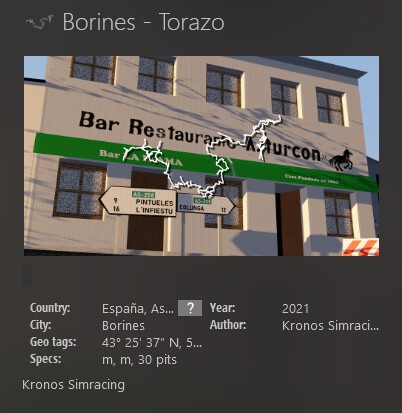
Recommended Track: Borines - Torazo (also by Kronos SimRacing), very twisty narrow roads and very very fun, although watch out for the unexpected hairpins. What really stands out for me other than the stage itself is the fact that it doesn’t look bland as other rally maps that do not even have trees and the grass is just an image copied over and over again. However, I have to admit that I’m a little biased because I live one hour from this region of Spain.

Why do you recommend these settings: First of all, I just wanted to say that I’ve been developing these settings for more than a year; after trying many track/car combos and twitching with every setting there is. I recommend these settings for various reasons:

Firstly, I recommend these settings because the power output is limited to only 40% because when countersteering if the power is set higher you get this sort of feeling of getting “dominated” by the wheel instead of yourself controlling the wheel. Moreover, when hitting a bump or cutting a corner slightly with this setting limited to 40% you’re not going to unsettle the car and lose time.

On the other hand, I don’t add any dampening or friction because I feel that the wheels reaction doesn’t match 100% with what the car is doing, in a way it makes every car feel like it has extra weight over the front end. Also it makes the steering heavier when countersteering, although, depending on the car you’re running it can be beneficial if it shakes on straights or the car feels like it reacts abruptly to your steering inputs, like if you have high sensitivity in a shooter game.

Secondly, I recommend these settings because the steering angle is set to 540 degrees. I always recommend to all of my friends to run 540 degrees because it makes a lot of difference, most importantly this will make you turn the car in faster and get much more control over the car. Furthermore, less stering angle also means faster and easier countersteer and not getting as tired over time, especially with cars that have a loose back end and are prone to spin out easily (Porsche’s).

Thirdly, on the first image the last two settings will make the steering feel smother and less “raw”, I find it easier this way to control the car and countersteer, but it can be turned down to zero depending on what you’re looking for or depending on the car, like a FWD F2 hatchback.

Moreover, in the game effect section in the cammus app I use 100% on the first three settings an 0% on the last two. The first three settings to 100% because otherwise they can limit the ffb and get rid of details and about the last two settings I have them turned off because as mentioned earlier I don’t like running friction and the spring setting adds a self-centering force which the game already has, basically making this setting useless.

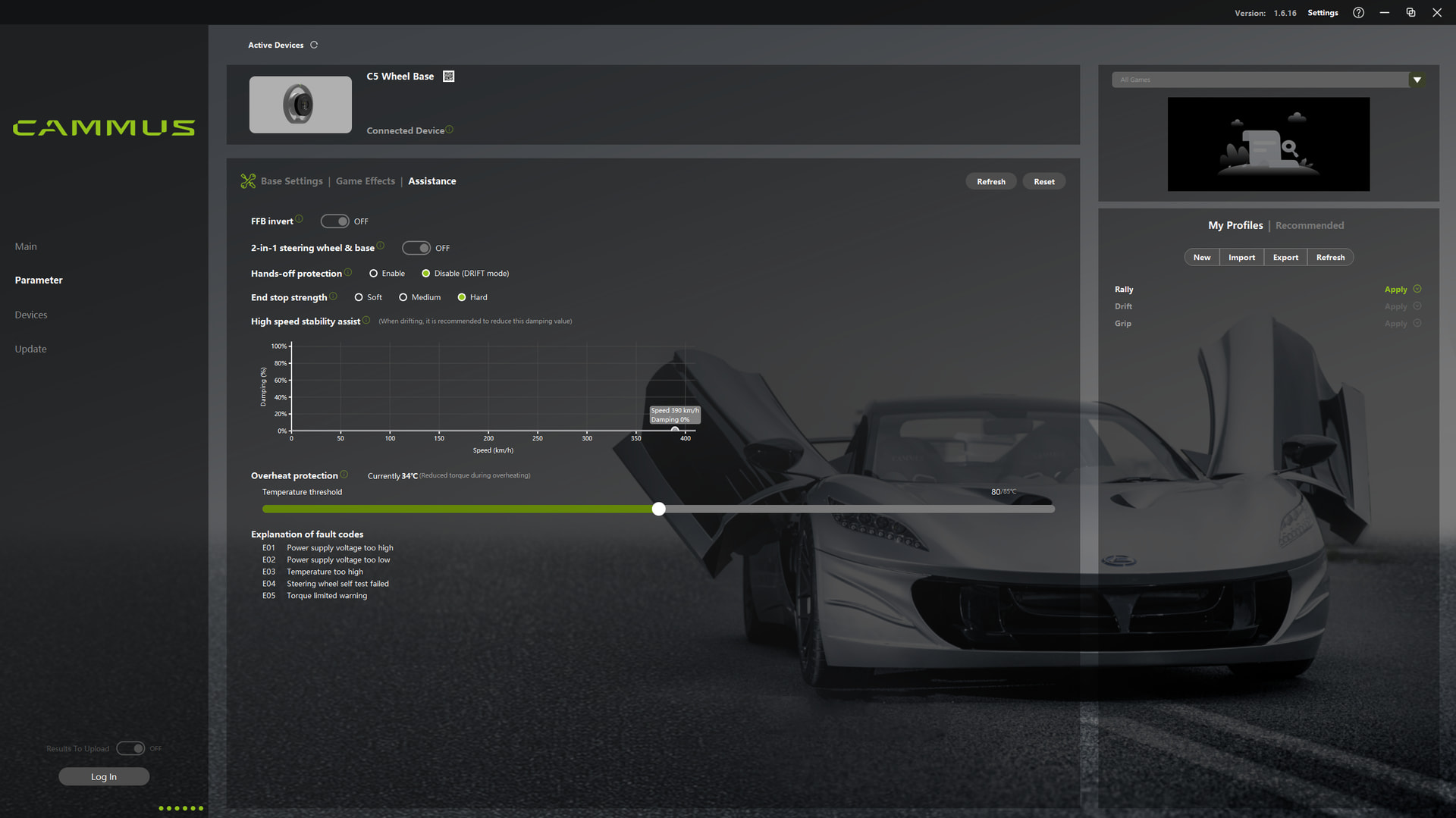
In regards of the hands-off protection I disabled it, otherwise whenever you crash and try to recover, the wheel will dampen itself for up to a minute. About the end stop strength is up to you, it doesn’t make a difference when playing.

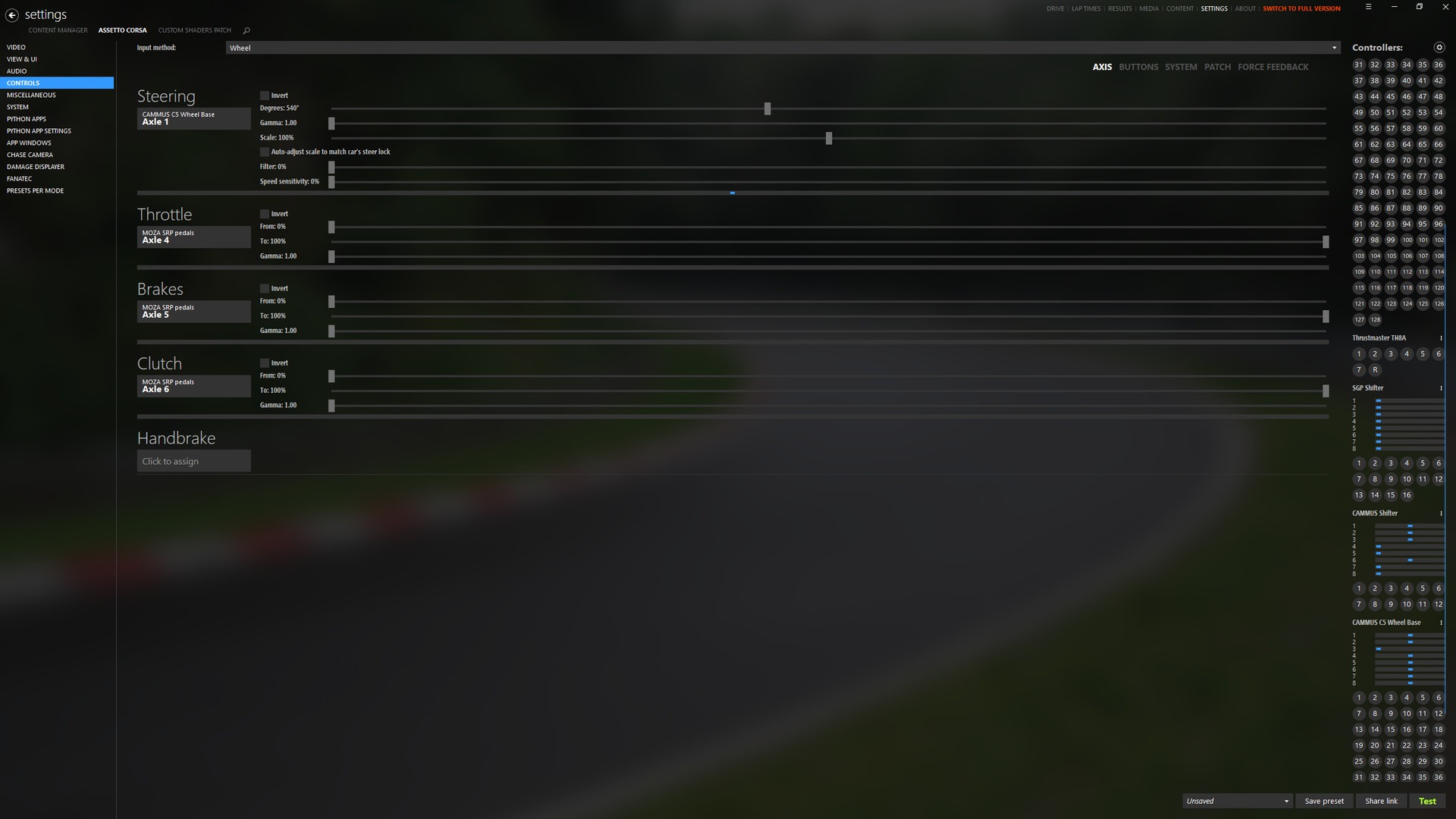
Lastly, I wanna talk about the settings on assetto corsa. Obviously the steering range same as in the cammus app, and overall the ffb settings are adjusted so as to have the most detail possible but eliminating the effects that don’t add up and actually make the ffb uneven and rough. Regarding the gain , I noticed that it is best to have 100% gain and lower the FFB than having less gain but higher FFB, the reason behind this is that I found out that AC could eliminate details in the FFB if the gain is to low, not sure at which value it starts but approximately when going down from 80%, eventhough it does not make a lot of difference at the end of the day.

All in all, what I was looking for when developing this settings was not to lose any FFB details, feel exactly what the car is doing without any effects getting in the way, make it easy to play long sessions and control the car easily.

Thanks for taking the time to reads this post, I hope I win the H pattern gear shifter.

6 Likes

[ACC][PS5] C12 for PS5 – by Topguru
[ACC][C12] General GT3 Beginner Setup – by Kevin Lei​​​​​​​​​

6 Likes

Game Name: Asseto Corsa

Device Model: Cammus C5

Base Parameter Screenshot:

In-game FFB Screenshot:

Recommended Vehicle / Car Category: Mazda MX-5

Recommended Track: Options configured while training Okoyama circuit, but they are good on others track.

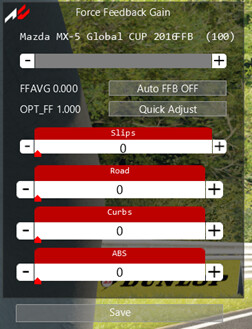
These settings work great for the Mazda MX-5. You can really feel the track surface and the kerbs, and it’s very clear when the car loses grip because the steering goes light.

4 Likes

Hey Cammus Team!
​You might remember me from the last giveaway — I sent you tons of screenshots proving my lap times. Luck wasn’t on my side then, and I’ll be honest: I was so gutted that I haven’t played for two months. But I’m back now because my passion for racing is stronger than my disappointment.
​Here is the thing: I still don’t have a wheel. While everyone else is arguing about FFB settings, I am hitting 2:17 at Spa and 2:03 at Mount Panorama using just a mouse.
​For most people here, this giveaway is a chance to get a second or third wheel to sell. For me, it’s a chance to get my very first one. I don’t have FFB settings to share, but I have the raw skill and the hunger to win. Imagine what I could achieve with your Direct Drive system if I’m already beating pros with a mouse?
​Give me the chance to switch from a mouse to Cammus. I will cherish this wheel for years, and I’ll show the world what happens when you give a dedicated player the right tools.
​Looking forward to a fair race and hoping for a bit of luck this time!

3 Likes

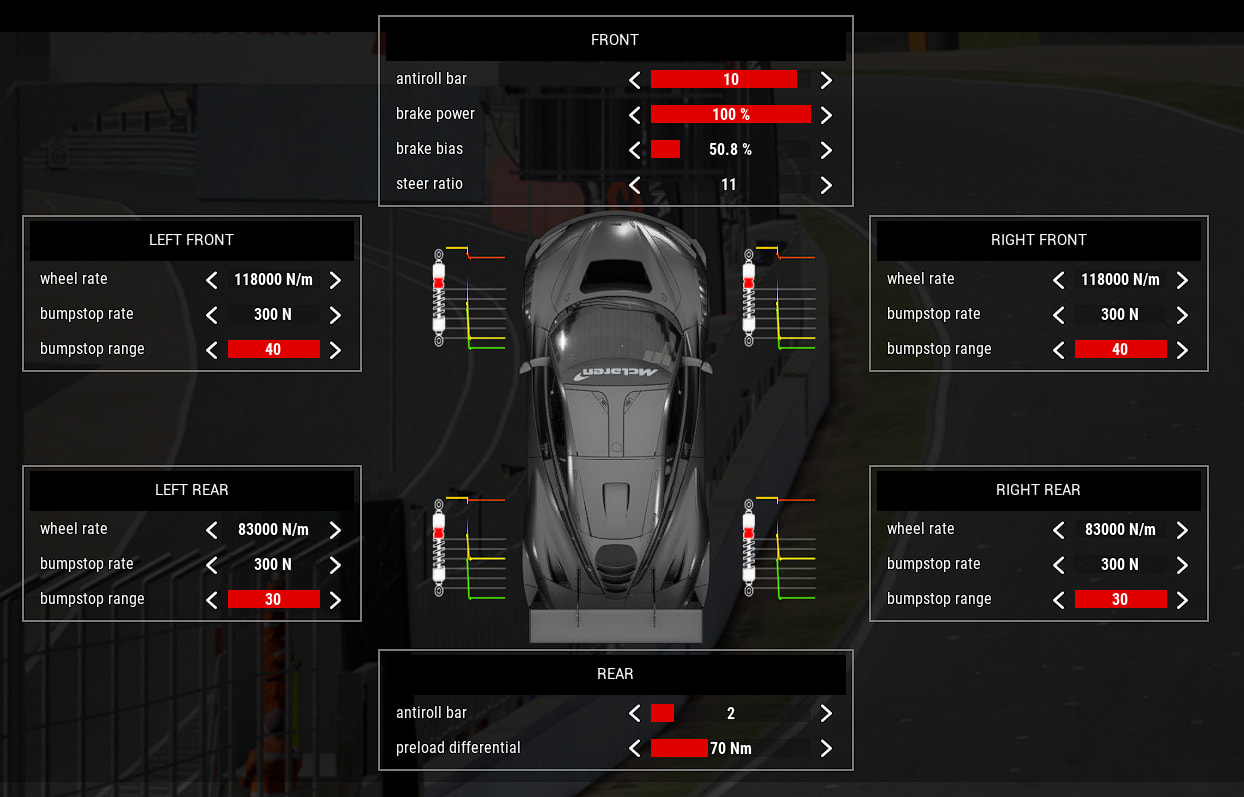
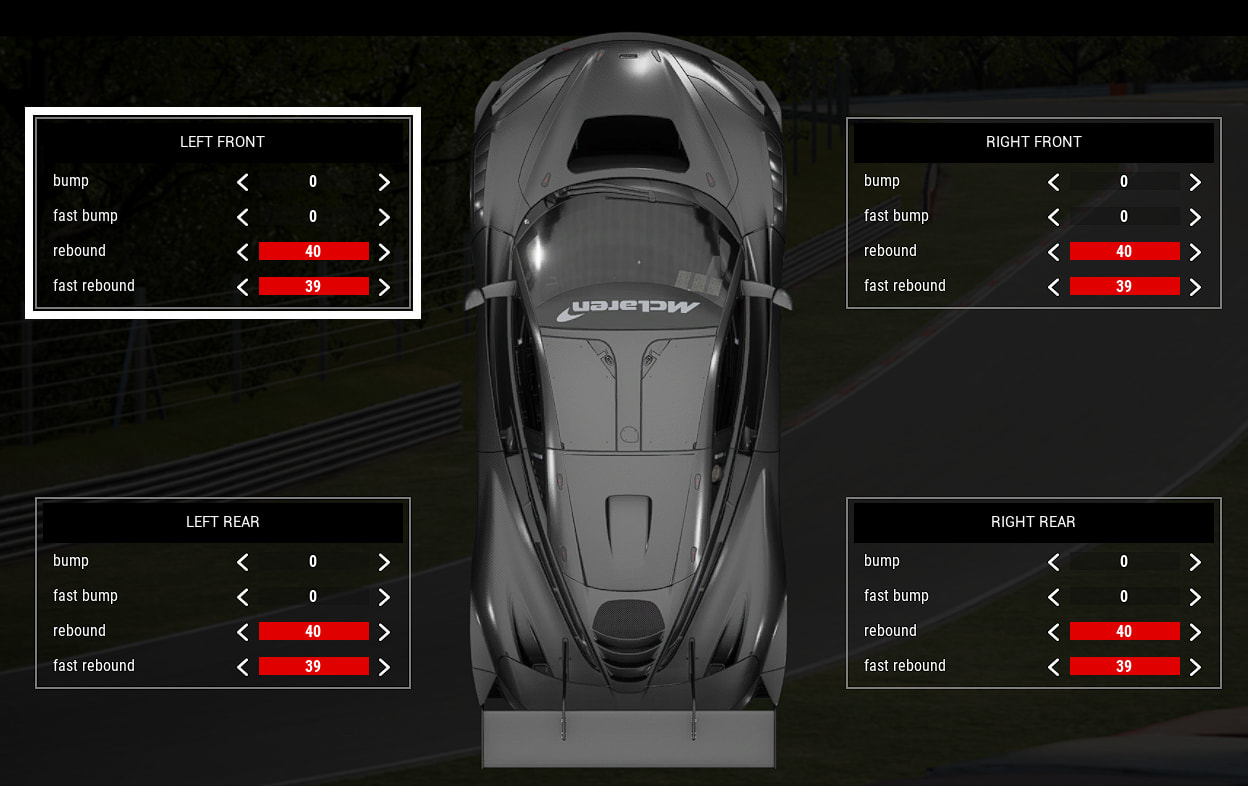
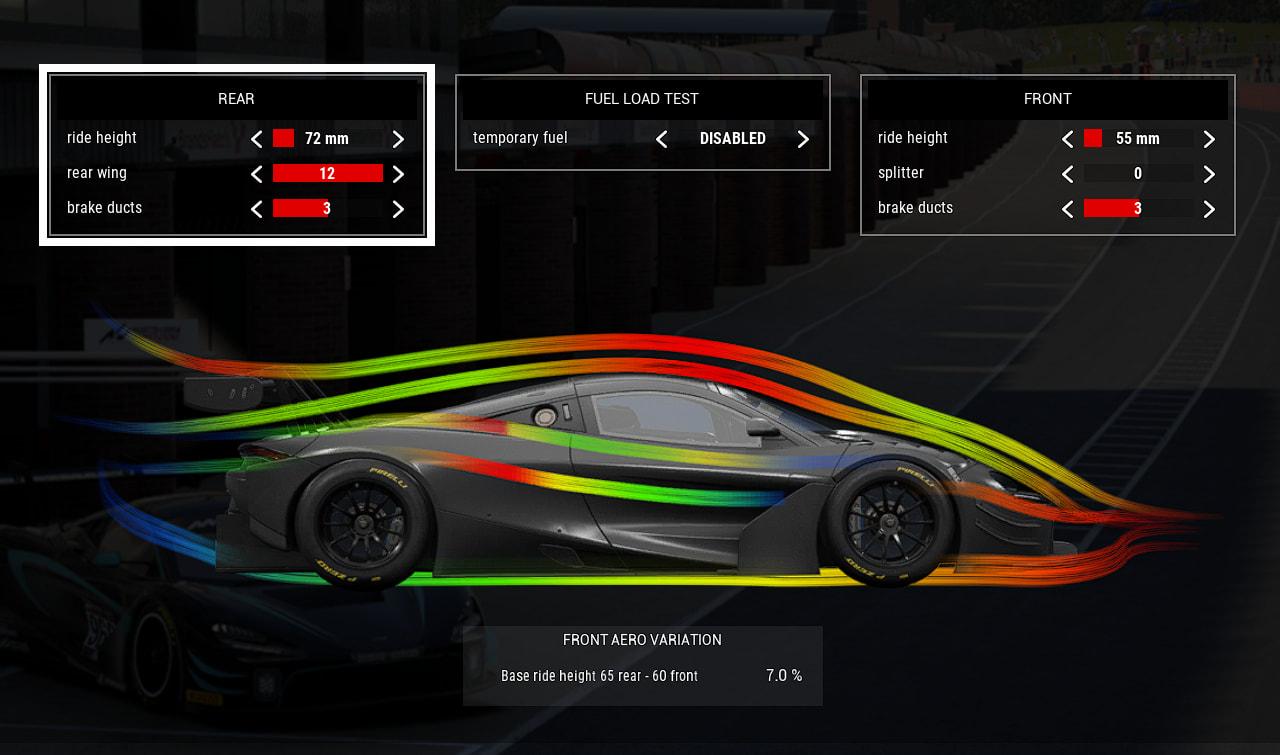
[ACC][C5] McLaren GT3 Evo on Brands Hatch – by splonki

Game Name: Assetto Corsa Competizione

Device Model: Cammus C5

Base Parameter Screenshot:

In-game FFB Screenshot:

Recommended Vehicle / Car Category: GT3 – McLaren 720S GT3 Evo

Recommended Track: Brands Hatch GP

Why do you recommend these settings?

C5 owner here, running a DIY cockpit setup. These settings are dialled specifically around the C5’s torque range. This is what actually works for me after a lot of trial and error.

I match the steering angle within the game, usually matching the angle to the car or just setting the steering angle at 800 and making the game auto-set the angle

I keep the power at 100% in the software, and I set the in-game ffb at 80-90%. I can run the wheel like this for 3-5 hours straight without losing ffb

dampening and friction between 10-15%, so it is on and just adjust it in-game so I can get the effects

I really don’t like the idle spring in the cammus software so I just have the ingame one on.

Hands-off protection: Disabled because sometimes hands off protection loses power which can throw off power but I keep it on for friends

End stop strength: Medium, soft felt too vague at the lock limit, hard felt violent. Medium is the right amount of warning without the jolt of going past the limit for a bit

Brands Hatch forces you to use every part of the FFB signal due to how complex the track is. You need to feel the front-end loading through Paddock Hill blind entry, the kerbs at Druids, and the traction limit at Clearways. If your settings are wrong anywhere, you’ll spin out alot alot. The McLaren has a sharp front end and communicates tyre state better than most GT3s, which makes it ideal for tuning feel. Running these settings, I’m sitting at a 1:30.075 PB at Brands, still room to improve, but the settings are consistent, and I can feel exactly what the car is doing lap after lap. Lexus is also good in this but you can make the McLaren match the feel of the Lexus. I recommend using this settings because this allows for smooth control for a starter while not being off the best laps.

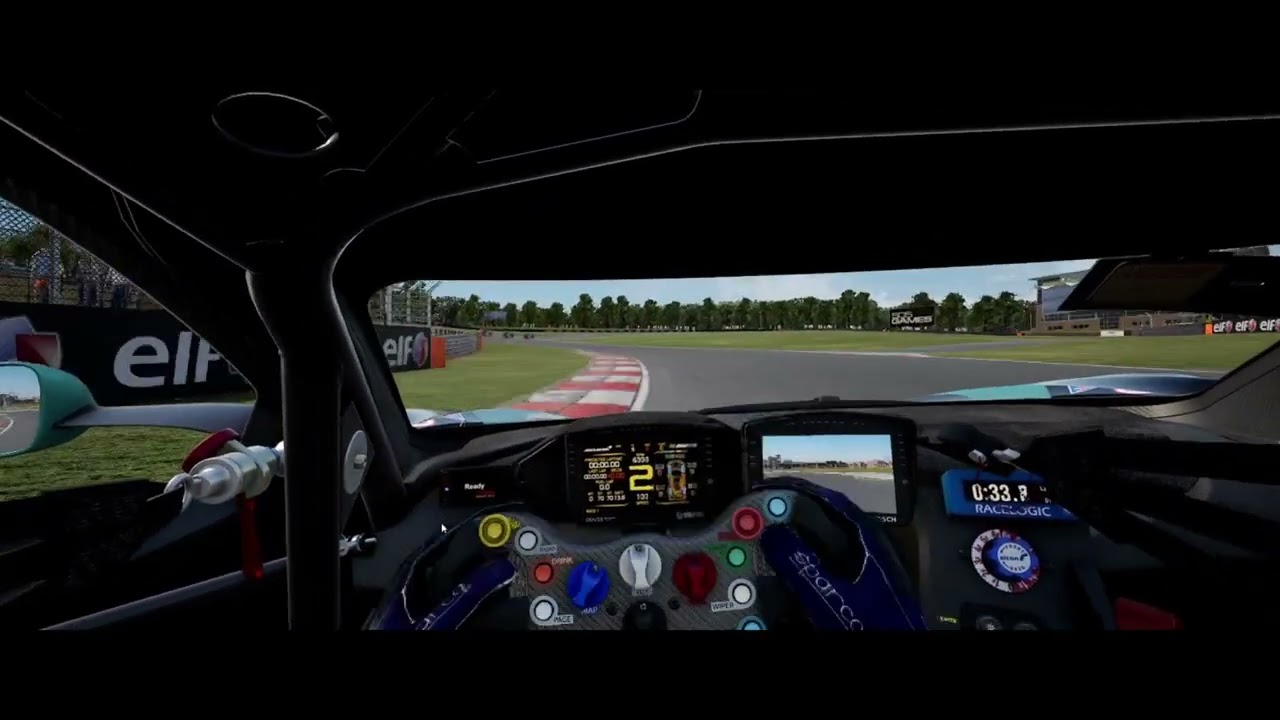
also here is the car setup I attached below along with me driving

Here is the test lap I did on the wheel

10 Likes

AC DDWB15 versatile settings

Game Name:Assetto Corsa

Device Model:CAMMUS DDWB15Nm

Recommended Vehicle / Car Category: A versatile settings profile for everything from drifting to open-wheel racing

Recommended Track: spa,sportsland_yamanashi

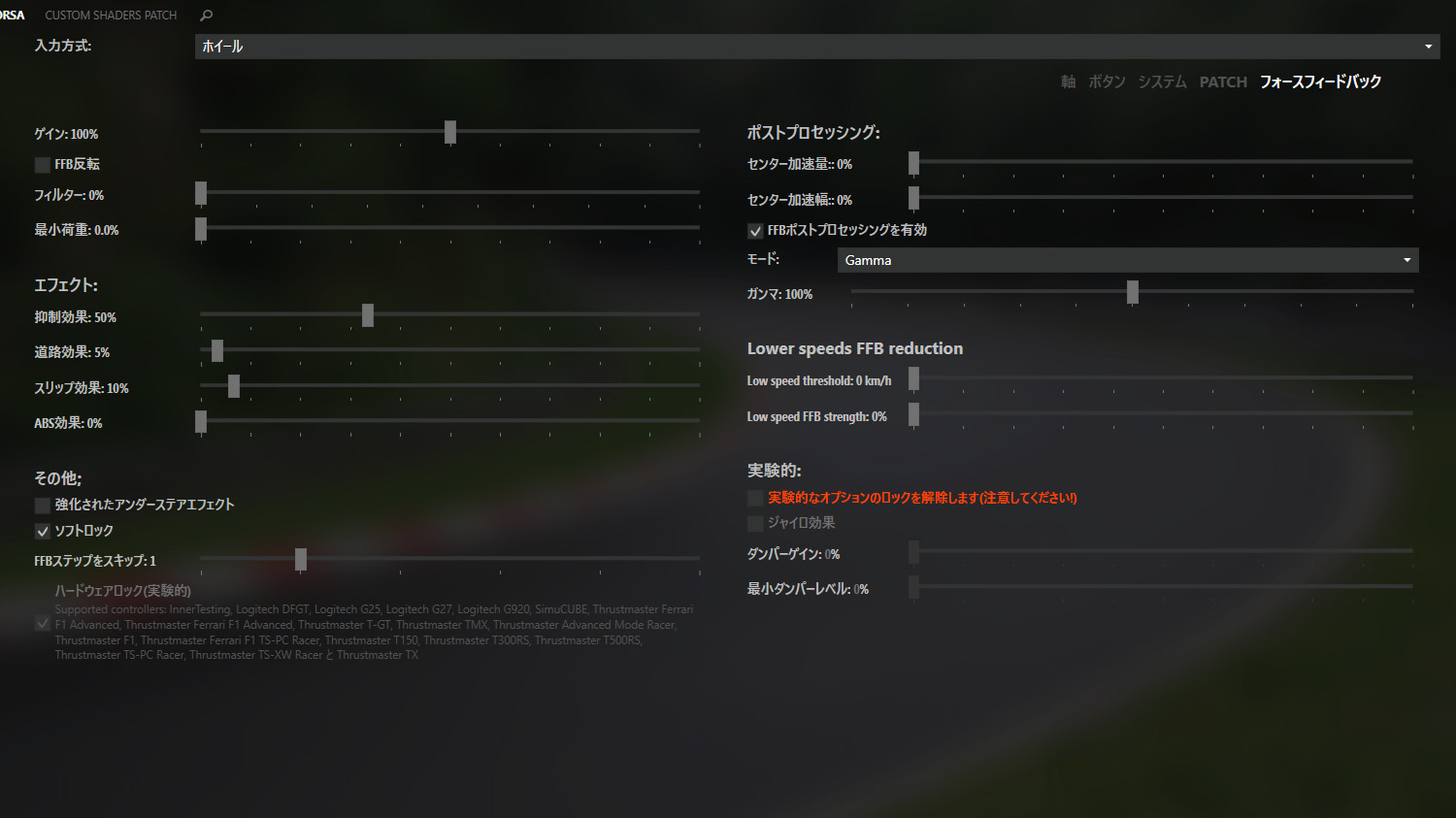
in-game FFB

Gain : 100%

Filter : 0%

Minimum Force : 0.0%

Damper / Gain reduction : 50%

Road effects : 5%

Slip effects : 10%

Skip ffb steps : 1

Soft lock : Enabled (ON)

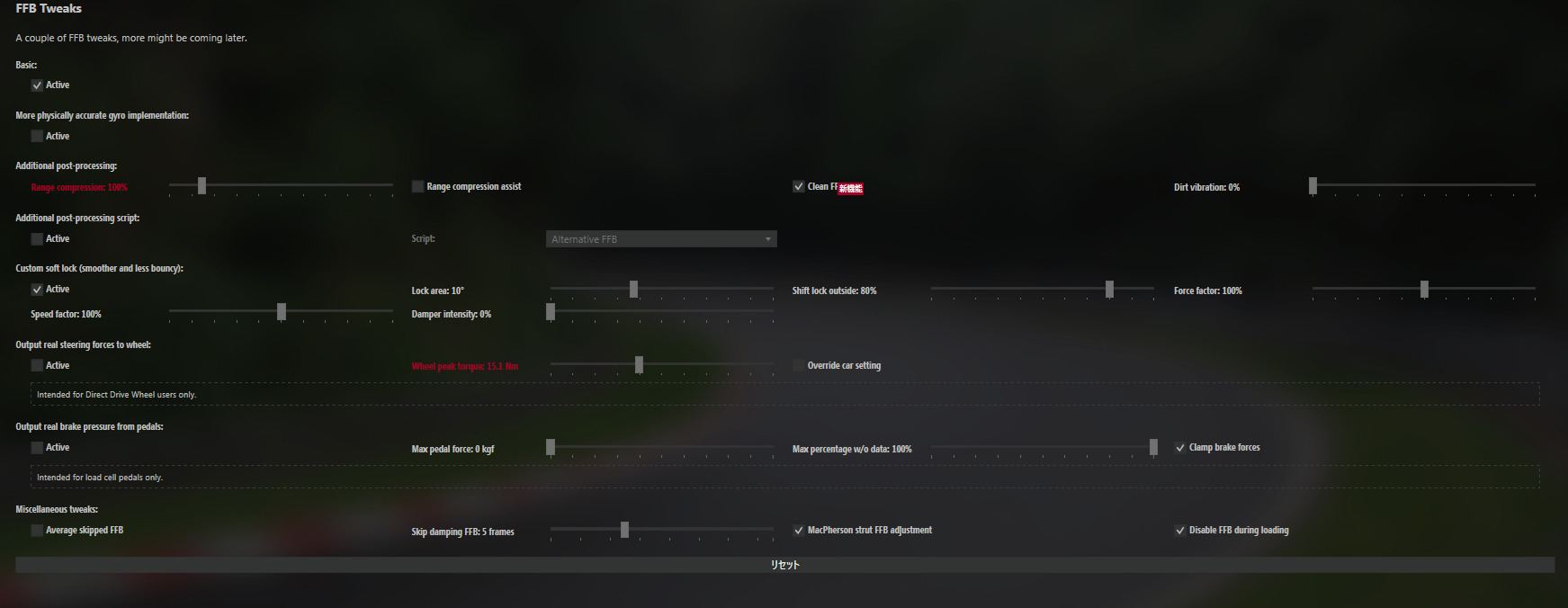
CSP FFB tweaks
Basic : Active
Custom soft lock : Active

FFB strength per car

・drifting:25%~

・GT3 : 50%~

・open-wheel : 80%~

8 Likes

[ACC][C5] Mouse Master Precision Setup: From 1:49 Monza on Mouse to Direct Drive Goals – by Mattsson Racing.

Game Name: Assetto Corsa Competizione

​Device Model: CAMMUS C5 (Target Device) / PC & Laptop Mouse Setup

Why do you recommend these settings?

​Hello CAMMUS Team and Community! My name is Dima Sazonov, I am 14 years old from Tolyatti, Russia. I have spent the last 8 years practicing combat sports (wrestling), which helped me develop ultra-fast reflexes and high hand-eye coordination.

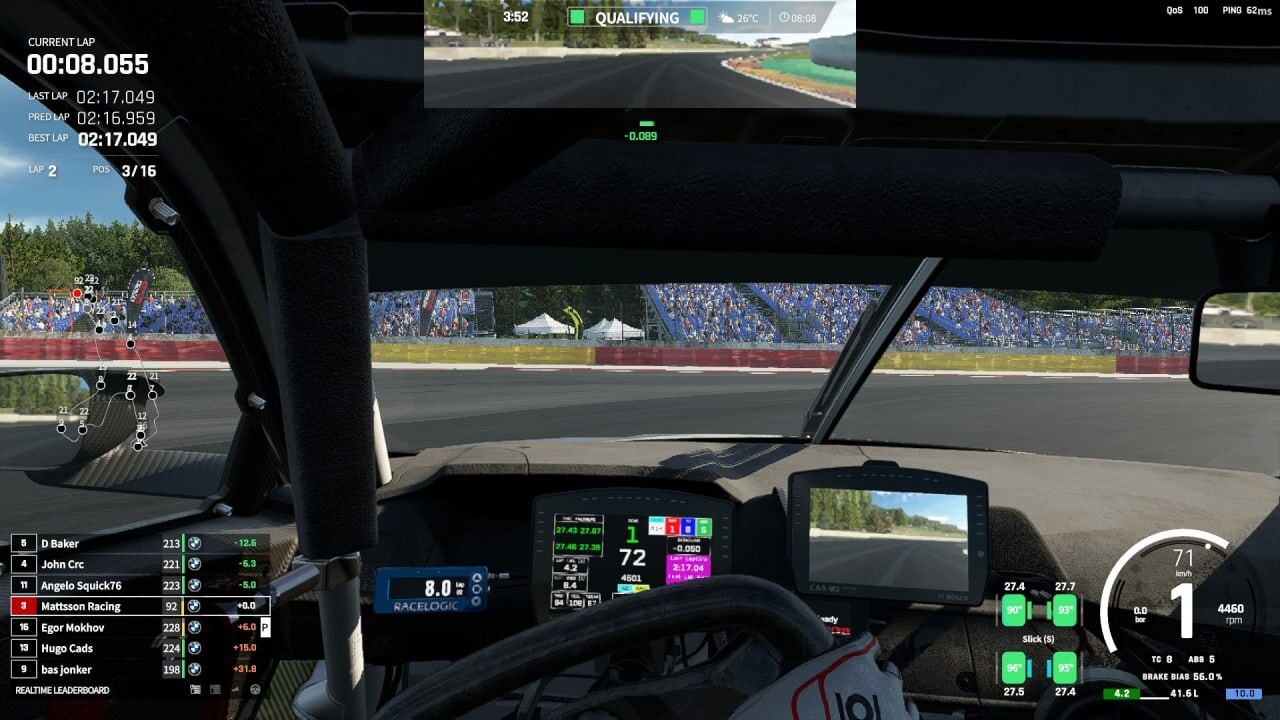
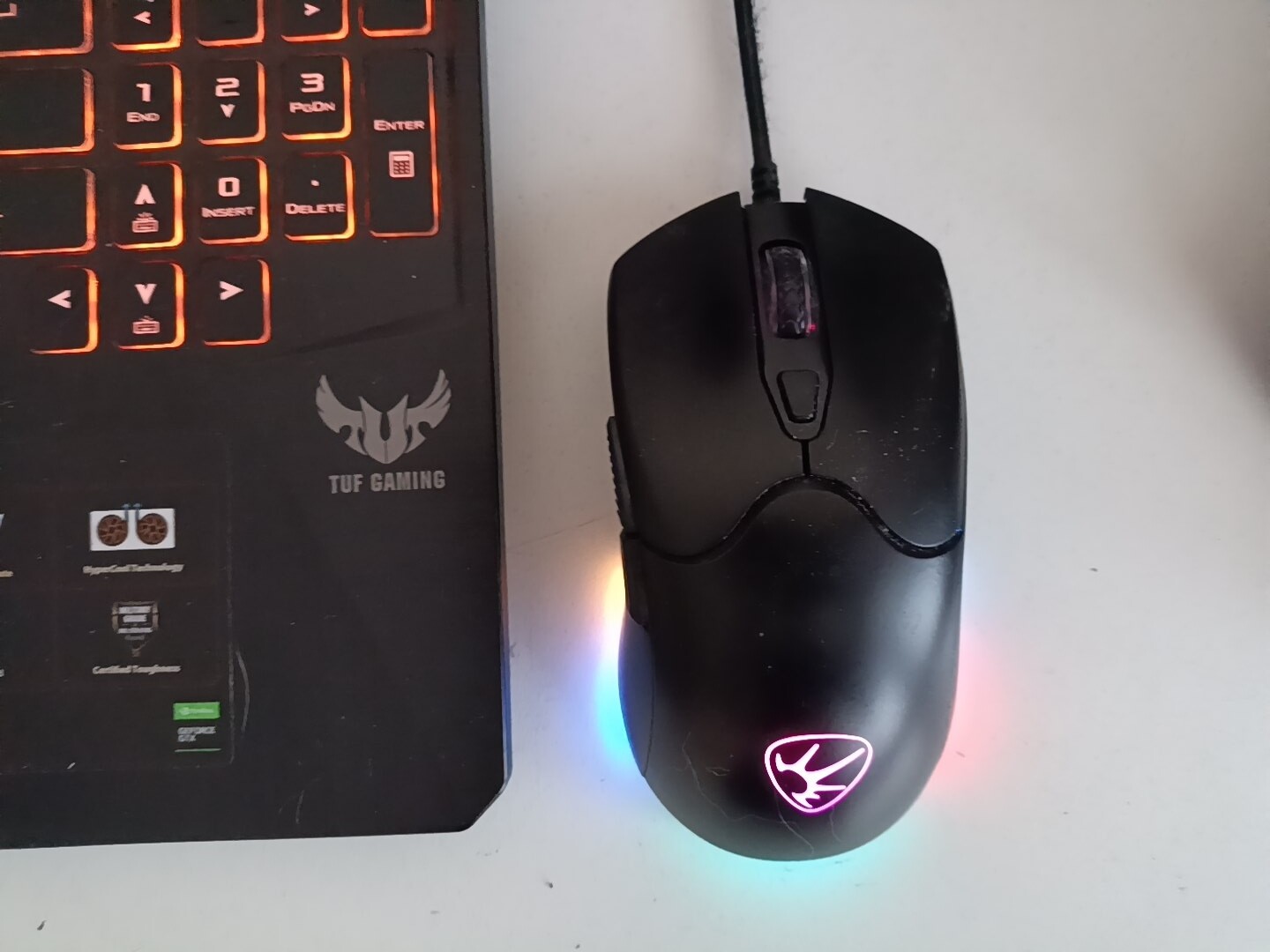
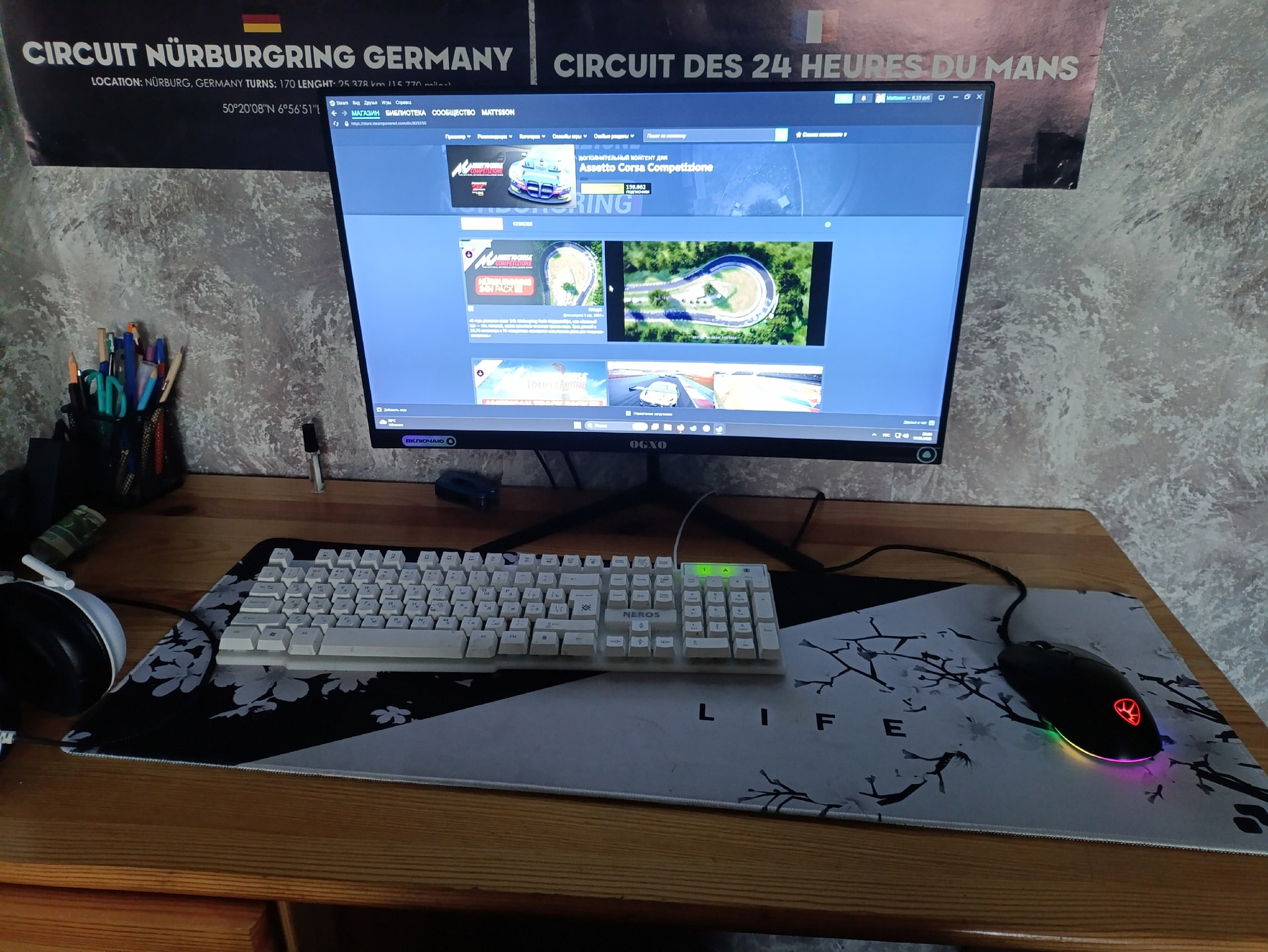
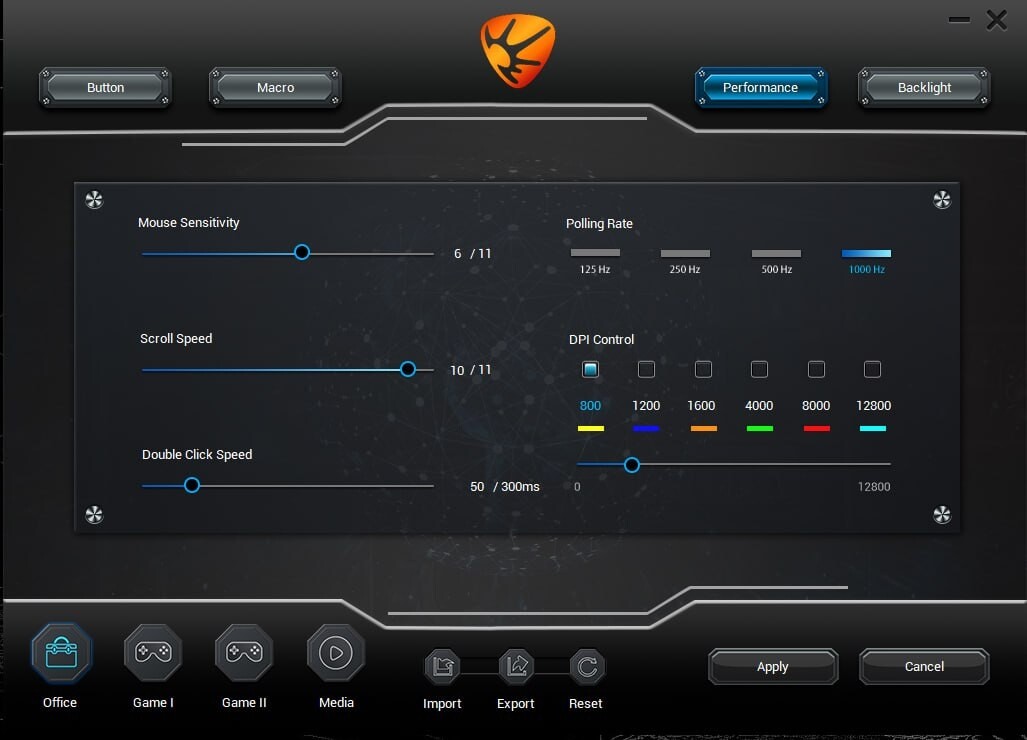
​I do not own a steering wheel yet. As you can see in my battle station photos, I drive using only a competitive gaming mouse and a keyboard right at my desk under my Nürburgring and Le Mans posters. Despite this hardware limitation, my passion for GT3 racing is unstoppable. Using my custom-tailored in-game parameter profiles for steering linearity and precise car setups, I manage to achieve lap times that compete directly with wheel users:

​Monza Circuit: 1:49.985 (BMW M4 GT3)

​Circuit de Spa-Francorchamps: 2:21.025

​24H Nürburgring: 8:41.955 (Clean lap)

​The Concept Behind the Setup (BMW M4 GT3 Preset):

Because steering with a mouse provides zero Force Feedback (FFB), I designed this entire car setup to prioritize maximum stability, visual predictability, and smooth aerodynamic balance on curbs.

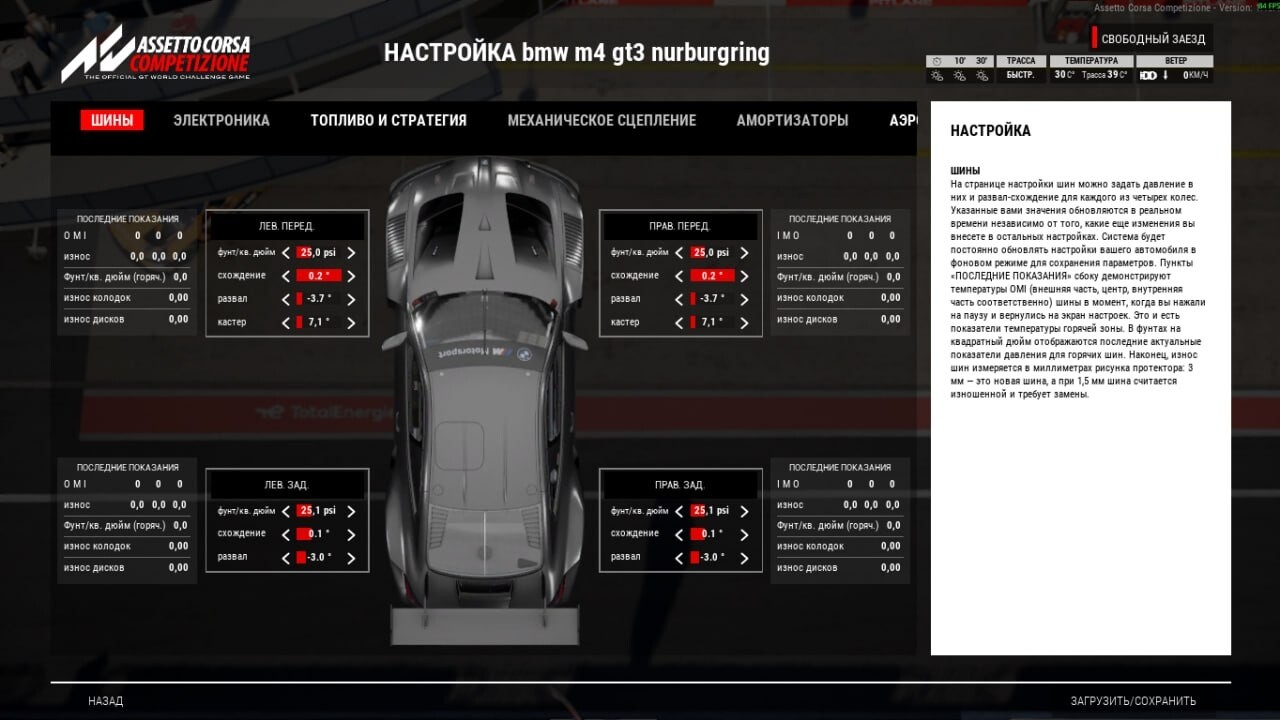
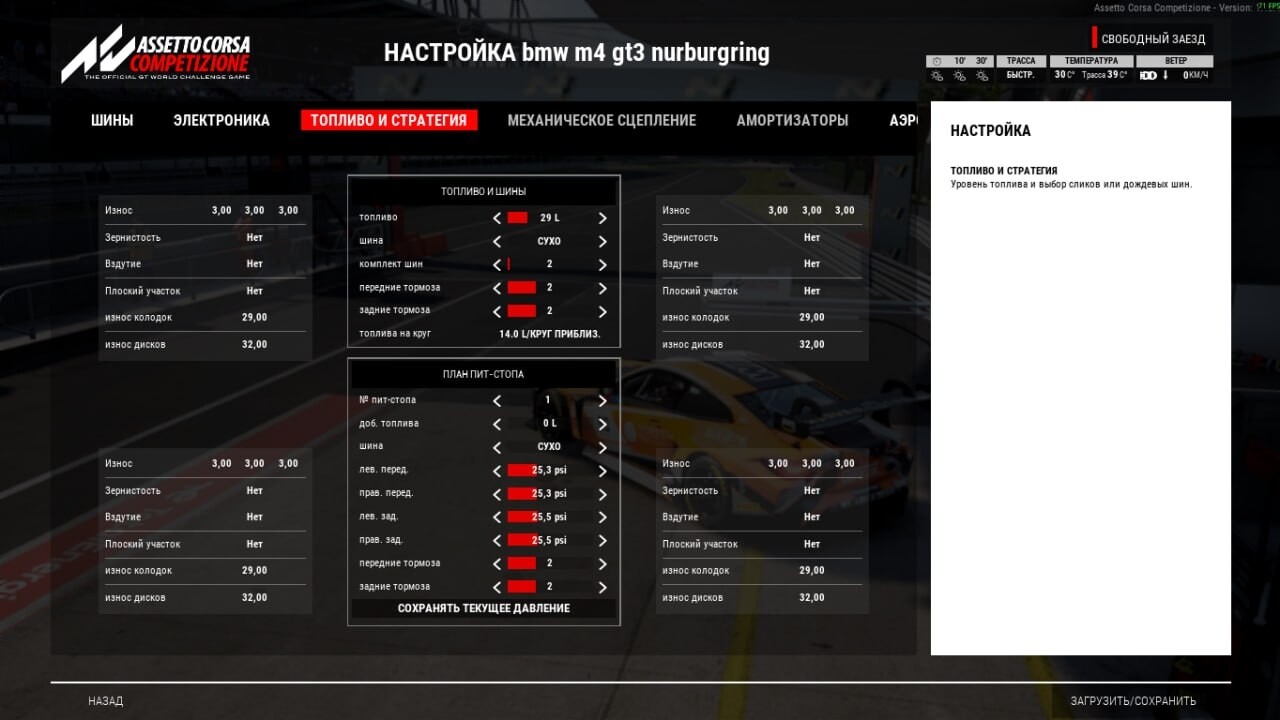
​Tires & Pressures: Adjusted precisely to 25.0 - 25.1 psi to ensure a consistent contact patch without sudden pressure spikes.

​Electronics: Running TC at 5 and ABS at 6. This acts as my “hardware safety net”, catching the car’s rear end before it snaps, since I cannot feel the slide through a steering wheel.

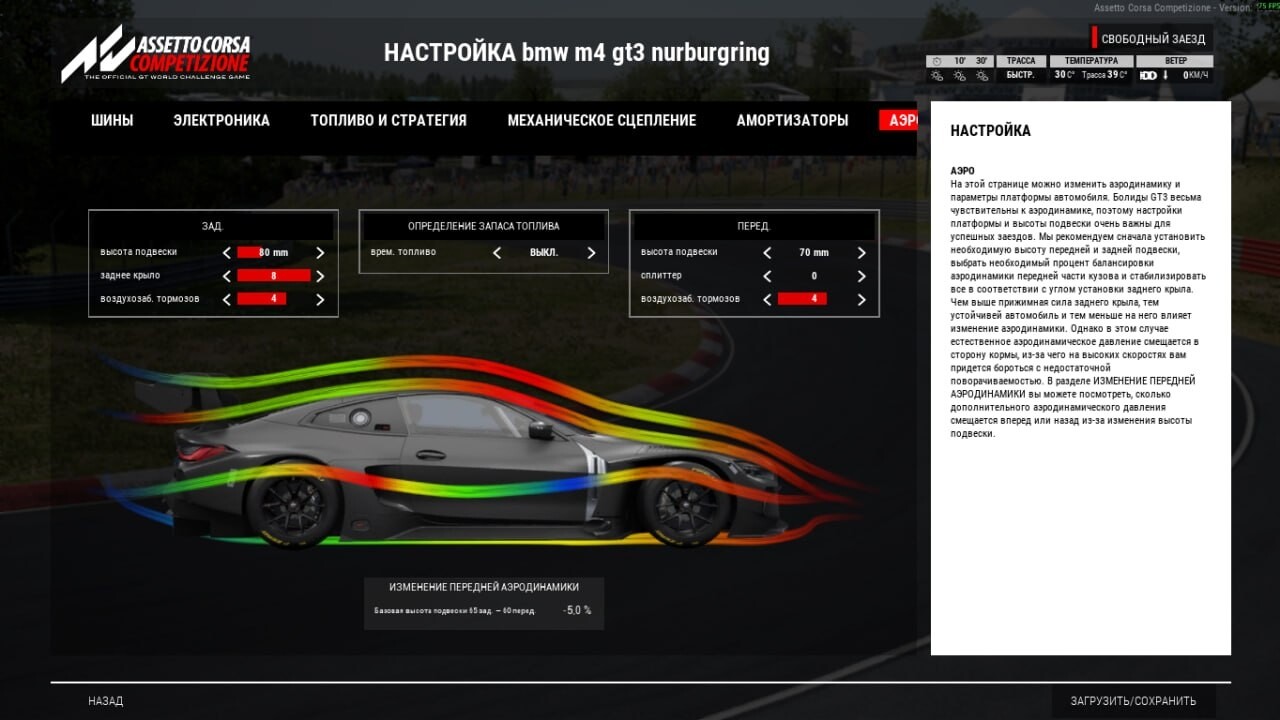
​Aerodynamics & Suspension: The rear wing is set to 8 with a ride height of 80mm to ground the car in high-speed corners like the Nordschleife or Eau Rouge, while the damper rates are tuned to absorb heavy curb strikes smoothly.

​I am already transferring these precise telemetry and stability principles into the new physics engine of Assetto Corsa EVO.

​Why I am entering this challenge:

I designed these specific car handling parameters with the performance characteristics of the CAMMUS C5 Direct Drive base in mind. My ultimate dream is to transfer my precision mouse-steering inputs into a real Direct Drive wheel. Winning the CAMMUS C5 bundle would allow me to finally step away from mouse emulation, level up my racing career, and prove to the world that pure passion and hard work can take a young driver from a standard mouse pad straight to the competitive sim racing grid!

Recommended Tracks & Cars for Beginners (My Personal Guide):
​Tracks: > * Monza: The ultimate starting point for beginners. It is easy to learn the basic layout, but teaches you everything about heavy braking zones and managing traction on exit.
​Spa-Francorchamps & Mount Panorama: Great baseline (“default”) tracks to test your mid-corner stability and high-speed confidence once you get comfortable.
​Nürburgring Nordschleife: The final boss. I highly recommend moving here only after you have fully mastered car control. It requires absolute concentration and sub-millimeter precision.
​Cars:
​McLaren 720S GT3 Evo, Ferrari 296 GT3, BMW M4 GT3: The best choices for beginners. These front and mid-engine platforms are incredibly stable, forgiving on the curbs, and predictable without force feedback.
​Porsche 992 GT3 R: Only for the nervous and brave! The rear-engine layout is tricky, but rewarding if you can handle the weight transfer.
​Mercedes-AMG GT3 Evo: Strictly for the fast drivers. To get the absolute maximum pace out of it, you need to run minimal electronic assists (low TC/ABS), which requires ultimate precision.

​Thank you for this opportunity!

Due to the forum’s 10-image limit, I have uploaded my full telemetry, fuel strategies, and advanced chassis/damper setup screens into a separate online gallery. You can review the complete blueprint here: cammus - Google Drive

4 Likes

the goat he is him everyone like this

2 Likes

Title: [AC][C12] Toyota GT86 on the Nordschleife – by

Ayman Mohsin

Game: Assetto Corsa |

Device Model: Cammus C12 | Pedals: Cammus LC100 v2

Base Parameter Screenshot:

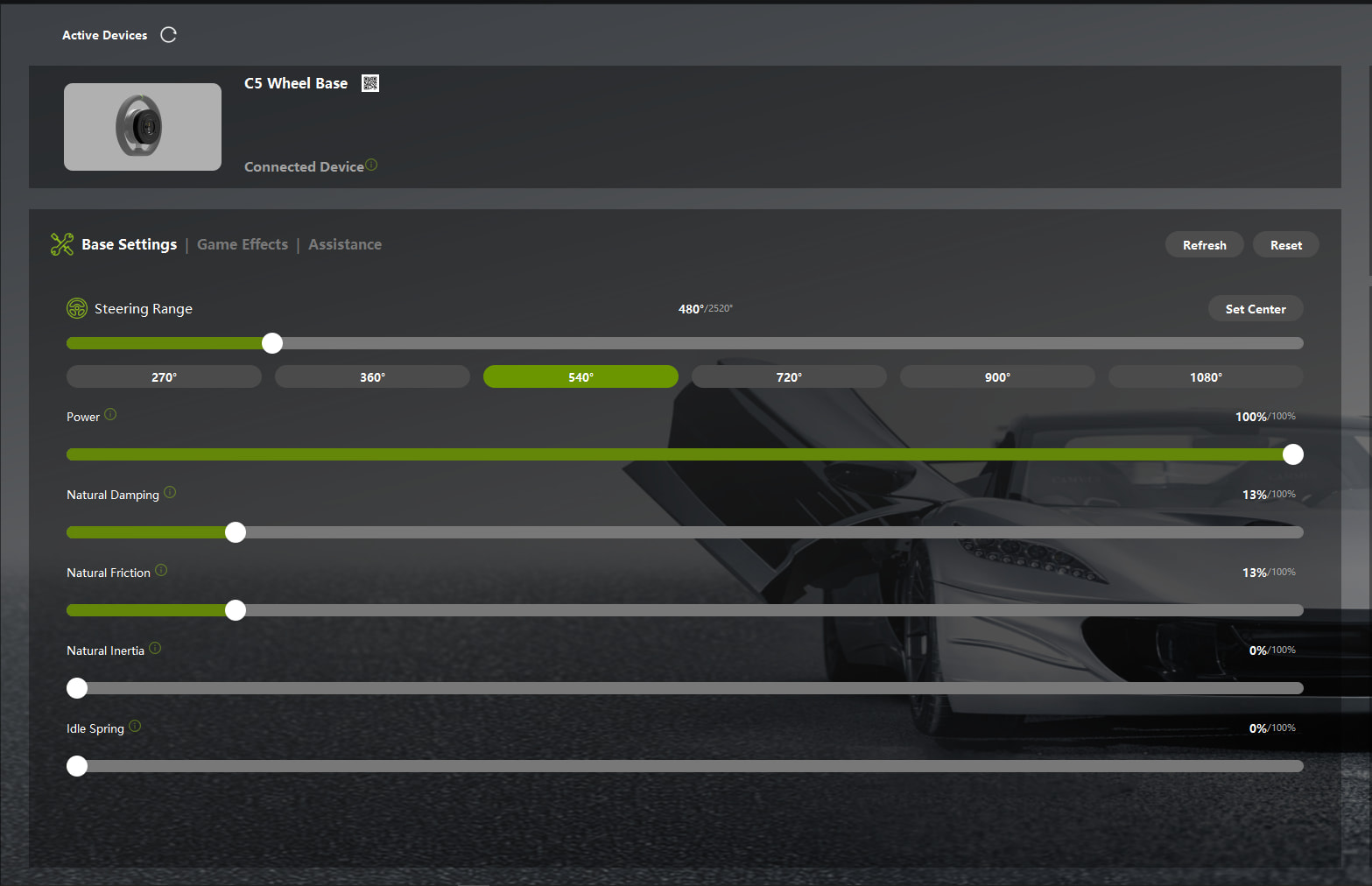
Cammus Base Settings:

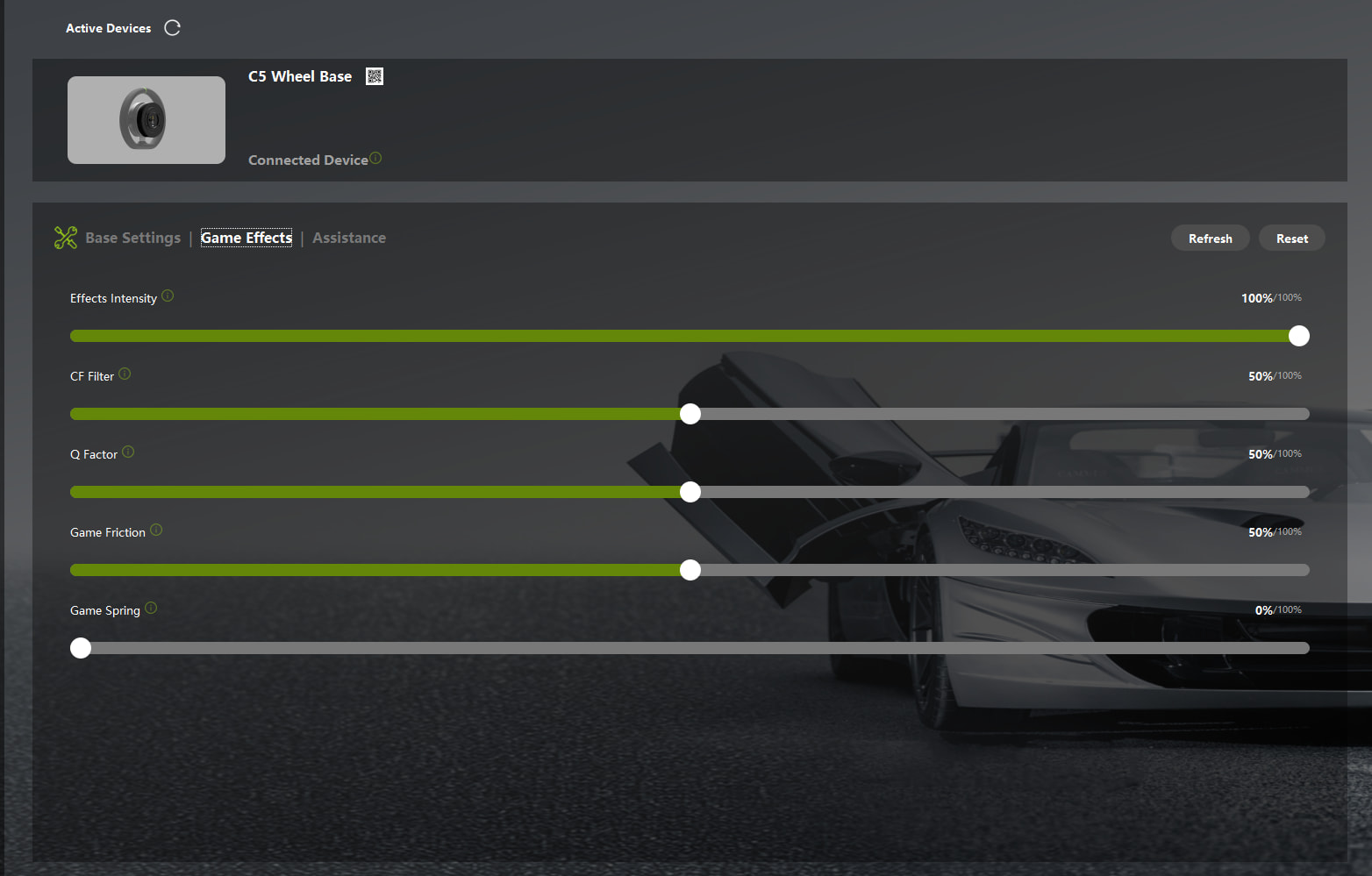
Game Effects:

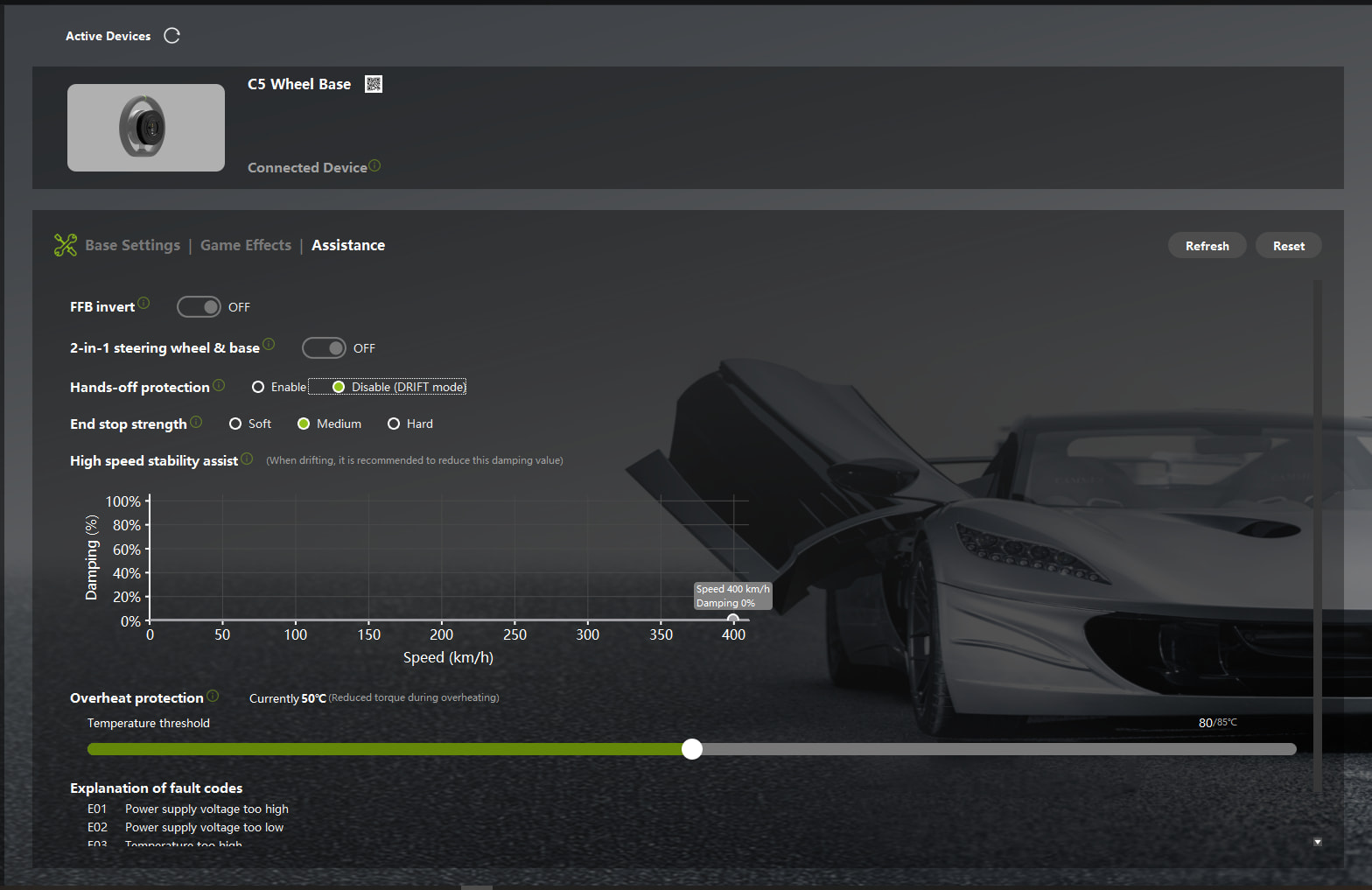
Assistance:

In-game FFB Screenshot:

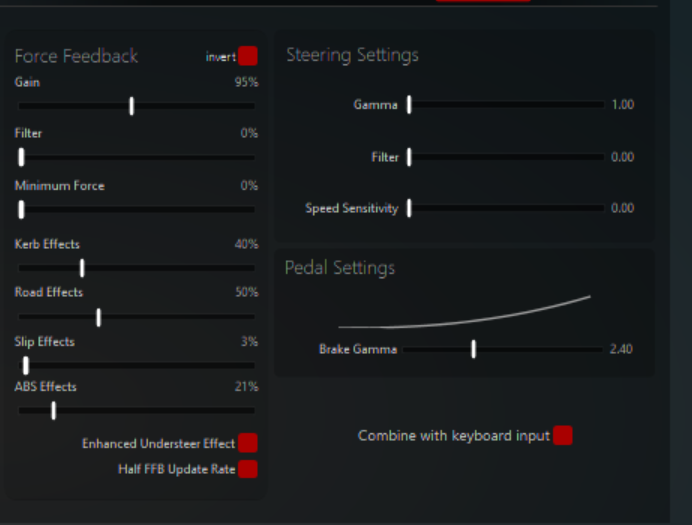
In-game AC FFB:

Recommended Vehicle / Car Category: Toyota GT86 or simple road cars

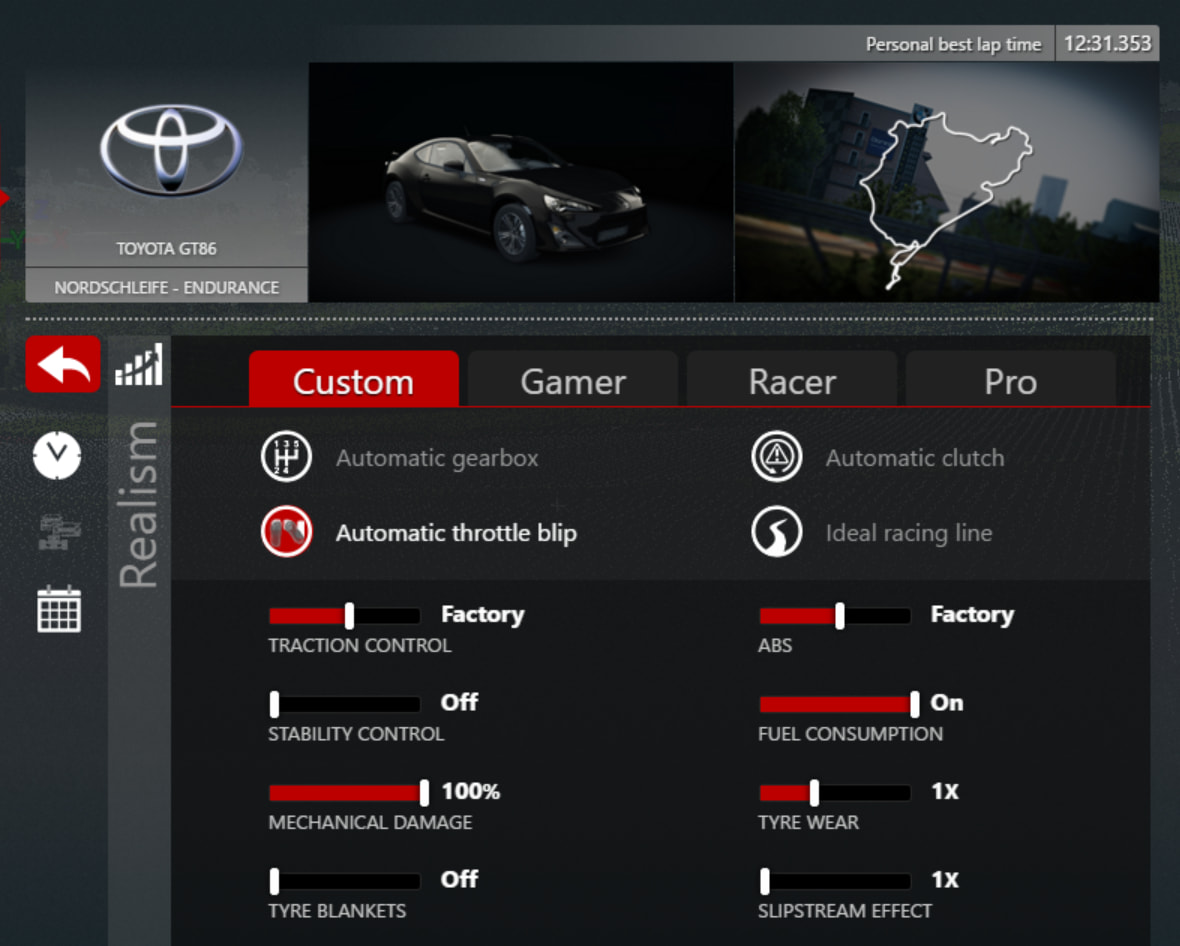
Recommended Track: Nordschleife – Endurance

Why do you recommend these settings?

Not every sim setup has to be about chasing lap times. Sometimes you just want to actually enjoy driving.

The GT86 on the Nordschleife is my go-to for exactly that. It’s slow enough that you’re not fighting the car for your life on every corner, but fast enough that the Green Hell actually challenges you. The track rewards commitment and smoothness more than raw speed, and the GT86 punishes lazy inputs without being punishing to drive. It’s the perfect combination for learning what good driving actually feels like.

The reason I run the C12 for this specifically is the wheel. The round rim that ships with the C12 is a close match to the GT86’s actual steering wheel, both in size and feel. I own a real GT86, and there’s something about the larger diameter that just clicks for me. My friend has the C5, and it’s a great wheel, but the smaller rim felt off for this car. The C12 closes that gap between sim and reality in a way that genuinely adds to the immersion.

Power at 80%. The GT86 is a light car with relatively light steering, and 100% on the C12 makes it feel heavier than it should. 80% hits closer to the real car’s force

Natural Damping 10% and Friction 10%. The GT86 has power steering IRL, and this low-friction level approximates that light, assisted feel without adding fake resistance.

Inertia 0%, Idle Spring 30%. The wheel already has enough inertia, so extra is not needed. Idle Spring is higher than most people run, but in the original AC, the game doesn’t generate as strong a self-centring force, so 30% fills that gap and makes the wheel feel like it has a natural home position, similar to actual power steering returning to centre.

CF Filter 75%. The Nordschleife has a huge amount of surface variation. This smooths out noise while keeping meaningful bumps, kerbs and mid-corner load changes clear.

Game Friction 50%. tells you what the front tyres are doing. On the GT86, this is especially useful because the car is naturally rear-happy, so feeling the fronts clearly helps you balance it.

25% Game Spring works alongside Idle Spring to give the whole wheel a consistent road-car weight. Together, they make the C12 feel less like a racing simulator and more like driving an actual car, which is the whole point of this combo.

Brake Gamma 2.40, tuned for the LC100 load cell pedals. The progressive curve means light pressure gives gentle braking, while pushing harder ramps up force quickly, which closely mirrors how the real GT86’s brake pedal responds.

Running these settings, I’m sitting at a 12:31 PB at the Nords, that’s 10+ hours in, and I’m still finding time. The settings are consistent and comfortable enough that I can run long sessions without fatigue, which matters more than peak lap time on a track this long.

6 Likes

[AC EVO][MOZA R3] i30 N at the Mountain – by Asfeem Kabir

Game Name: Assetto Corsa EVO

Device Model: MOZA R3

Base Parameter Screenshot:

In-game FFB Screenshot:

Recommended Vehicle / Car Category: Hyundai i30 N Hatchback

Recommended Track: Mount Panorama, Bathurst

Why do you recommend these settings?

Hey everyone! Quick note upfront, I’m on a MOZA R3, not a Cammus. The C5 isn’t available where I live, and honestly that’s exactly why I’m entering this. Been wanting to try one for a long time. So here are my real settings for what I actually drive with.

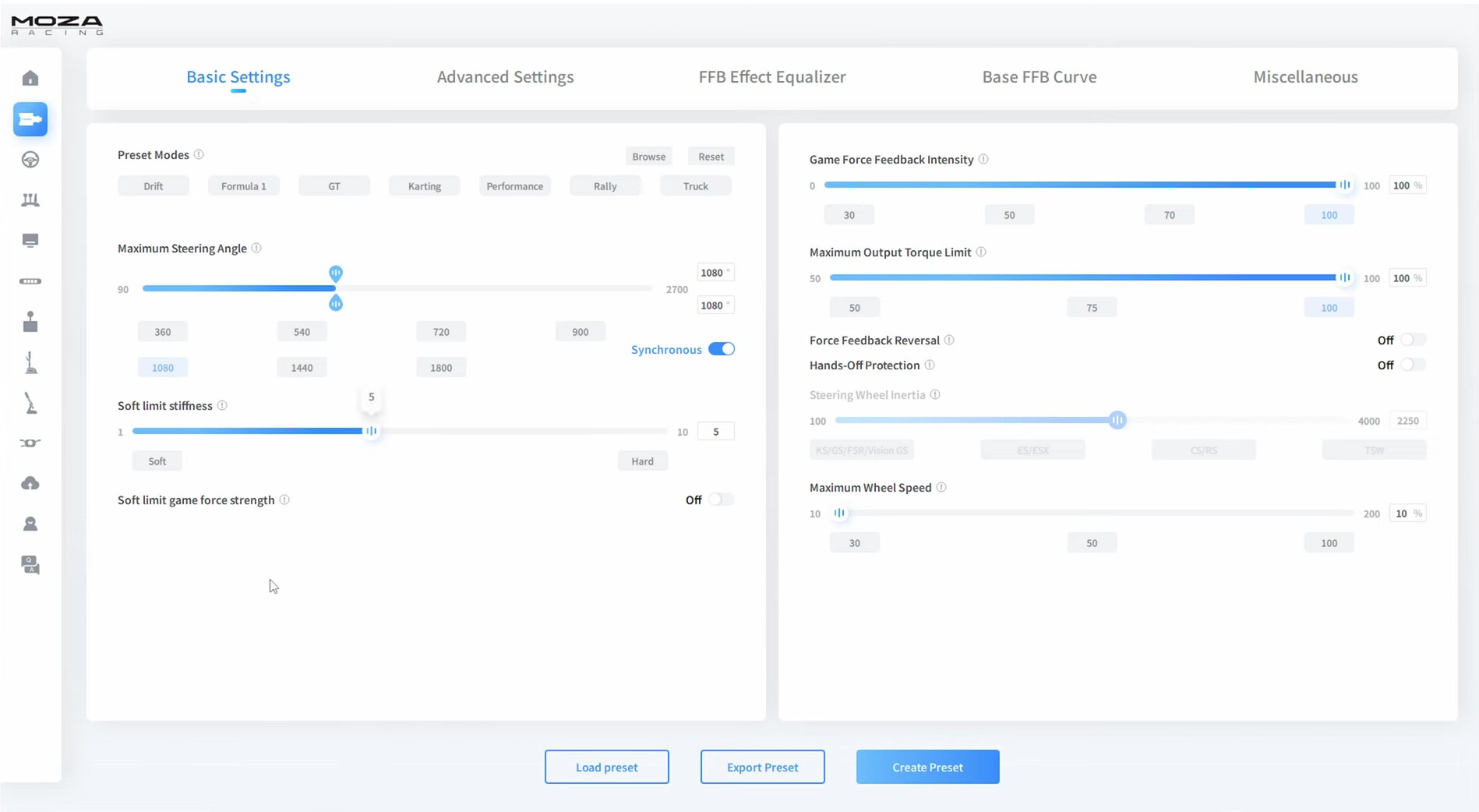
Steering Angle I run 1080° in both Pit House and AC EVO so they’re perfectly synced. Bathurst has a mix of tight hairpins and long sweeping stuff, and 1080° gives you enough rotation to be precise on both without your hands running out of wheel at Forrest’s Elbow or the bottom of the mountain.

Game FFB Intensity and Max Torque Both sitting at 100%. The R3 is a 4.3Nm base so I set it to it’s full power

Soft Limit Stiffness is set to 5, which is right in the middle. Firm enough to feel where the limit is, soft enough that if you clip it under stress it doesn’t cook your arms.

Hands-Off Protection Off.

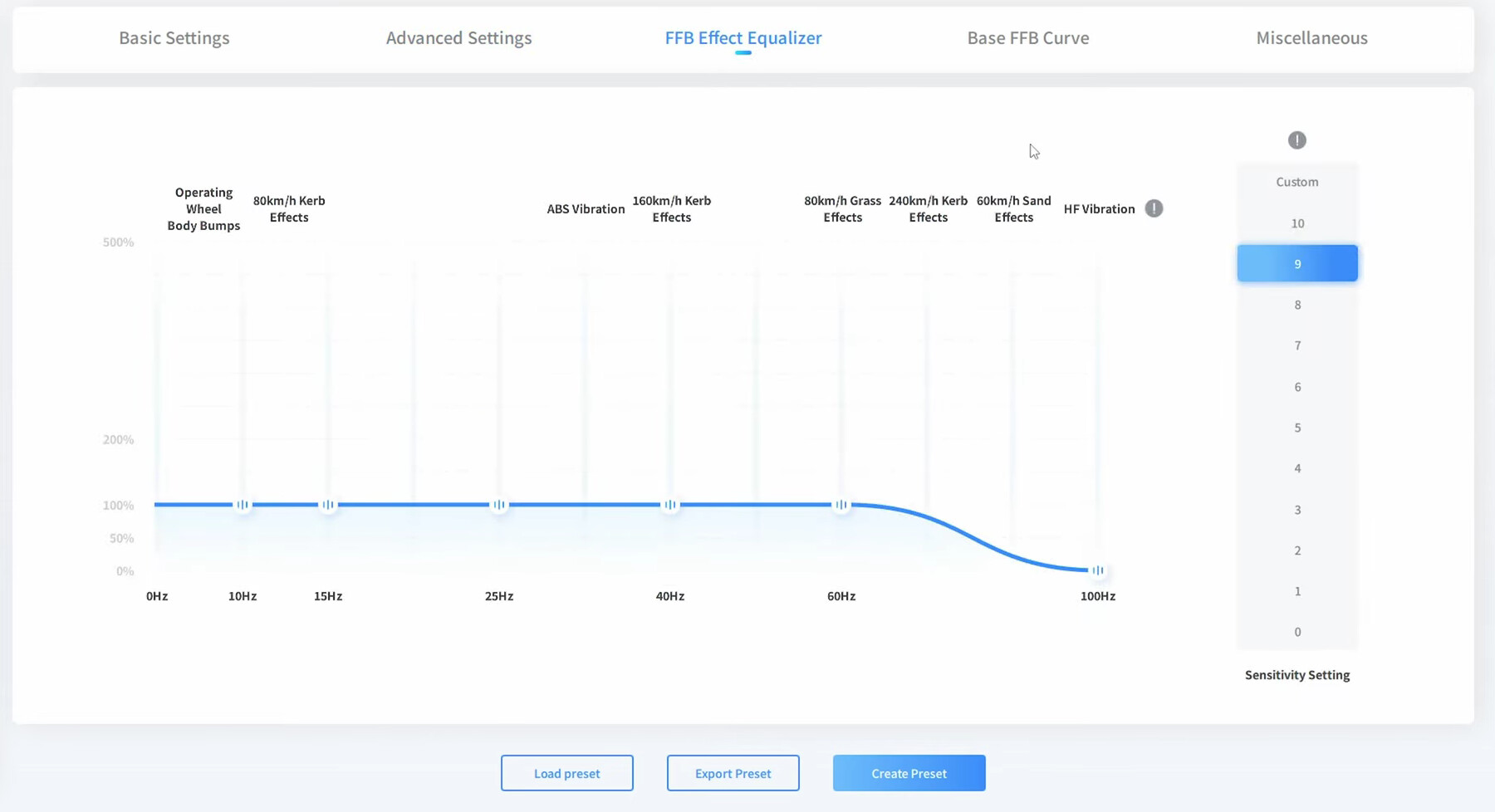
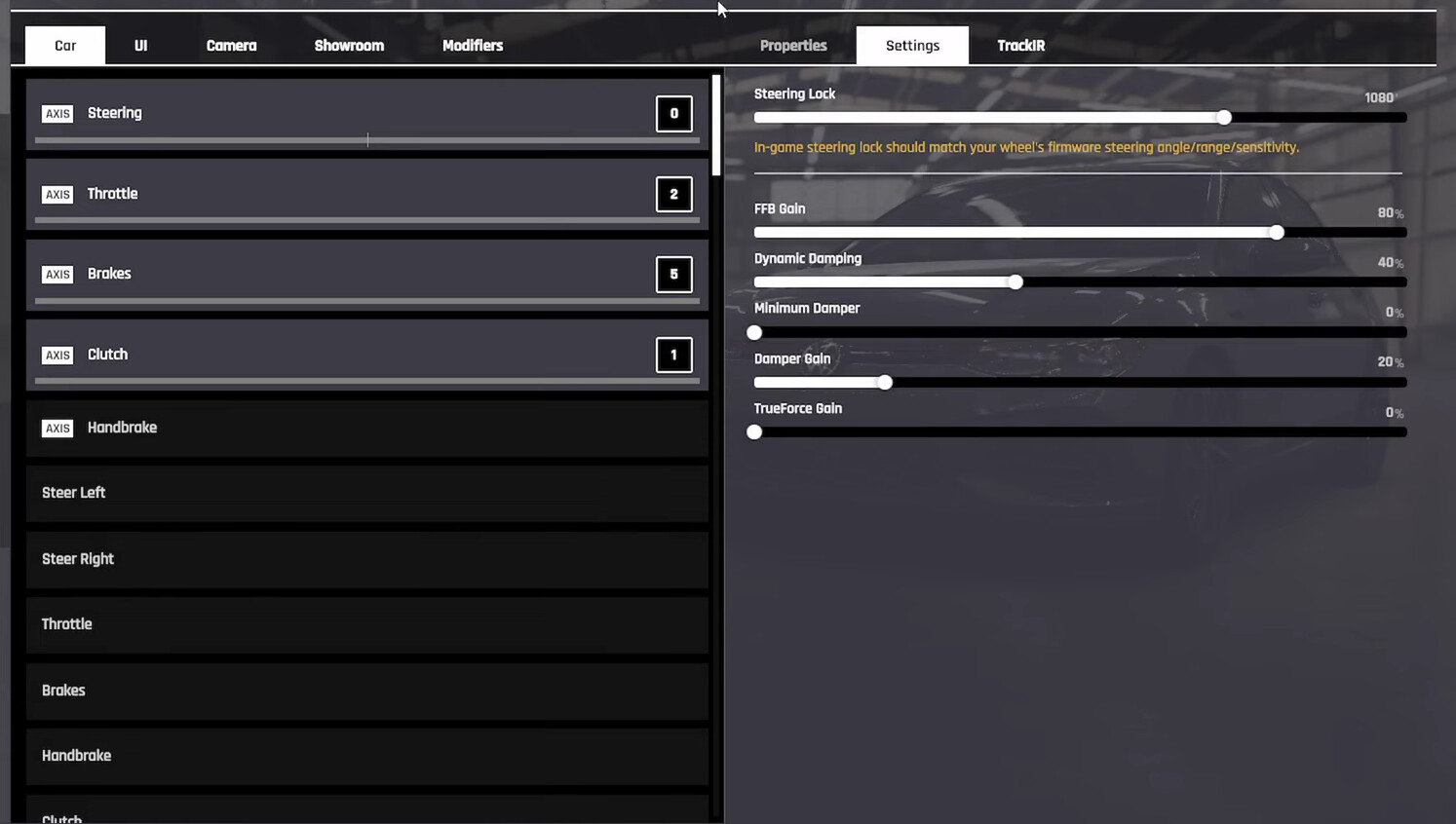
FFB Effect Equalizer Flat at 100% all the way to 60Hz, then cut down to basically nothing at 100Hz. This keeps all the meaningful information like road surface, kerb feedback and body movement, and removes the high-frequency buzz that keeps shaking the wheel constantly

FFB Gain Set to 80% in-game. Enough strength to feel what the i30 N is doing without clipping at the compression zones. Bathurst has some heavy dips and crests and too much gain means everything maxes out and you lose detail. 80% sits in the sweet spot for this track.

Dynamic Damping Running 40%, which is higher than most people go, but on a lighter base it helps fill out the weight of the wheel through the mid-corner phase. The i30 N is a front-heavy car and you want to feel that mass. At 40% the wheel resists the right amount when the front end loads up.

Minimum Damper and Damper Gain Minimum Damper is at 0% so there’s no artificial centring pulling the wheel around. Damper Gain at 20% adds just enough resistance to feel planted on the straights without killing the responsiveness.

TrueForce Gain Kept at 0%. Not relevant for MOZA hardware so leaving it here prevents any unwanted signal interference.

I’m an intermediate driver, been at it about a year. These settings aren’t about being aggressive, just to make the car readable on one of the hardest tracks in the game. Hope it helps someone!

6 Likes

[AC][DDWB15] Ferrari 312T at Monza – by Abrar Faisal

Game Name: Assetto Corsa

Device Model: Cammus DDWB15

Recommended Car: Ferrari 312T

Recommended Track: Monza

Cammus Firmware Manager — Base Settings:

Cammus Firmware Manager — Game Effects:

Cammus Firmware Manager — Assistance:

In-game AC FFB:

Grew up on Gran Turismo. Need for Speed. Midnight Club. Basically any game where you drive something fast and feel cool doing it. Somewhere along the way that turned into a genuine obsession with old F1 cars, the kind where the driver is doing ALL the work. No traction control, no ABS, no power steering, just raw mechanical grip and your own instincts.

When I decided to get into sim racing properly I did zero research into “starting wheels” and bought the DDWB15 straight. people thought I was crazy. First time I loaded up the Ferrari 312T and turned the wheel I genuinely had to let go because I wasn’t ready for it. Took a few sessions to build up to actually holding on through a full lap at Monza.

And then something clicked.

Why do I recommend these settings?

why the 312T:

This car should not be drivable by normal people. No aerodynamic downforce worth mentioning. A flat-12 engine that wants to kill you if you sneeze wrong at the throttle on corner exit. Brakes that work if you believe in them hard enough. And because there’s no power steering, every single thing happening at the front tyres comes straight through the wheel into your hands. On the DDWB15 that means it actually feels like what those drivers were dealing with in 1975. It’s the only way I’ve found to actually understand why those guys were considered superhuman.

why Monza:

It’s the temple of speed for a reason. The 312T was built for exactly this, long flat out sections where the flat-12 is just screaming, heavy braking into the chicanes, and those famous fast curves where you’re hanging on and trusting the car. The combination makes every clean lap feel like an achievement and every mistake feel appropriately punishing.

Cammus base settings:

Power at 45%. This is the most important setting for a high-torque base on a car like this. The 312T generates huge forces because there’s nothing dampening them mechanically. Running full power on the DDWB15 causes constant clipping which paradoxically gives you LESS information, not more. 45% keeps the signal in the range where you can actually read what the car is doing instead of just surviving it.

Damping at 6%, Friction at 0%. Tiny bit of damping to keep the wheel from oscillating on Monza’s long straights. Zero friction because the 312T’s steering already has plenty of natural resistance through the tyre loads. Adding friction on top just makes everything feel heavier than it already is.

Inertia 0%, Idle Spring 0%. Inertia would completely kill your ability to catch the rear when it steps out. And it will step out. Idle spring would create a fake centering force competing with AC’s actual physics. Neither has any business being on.

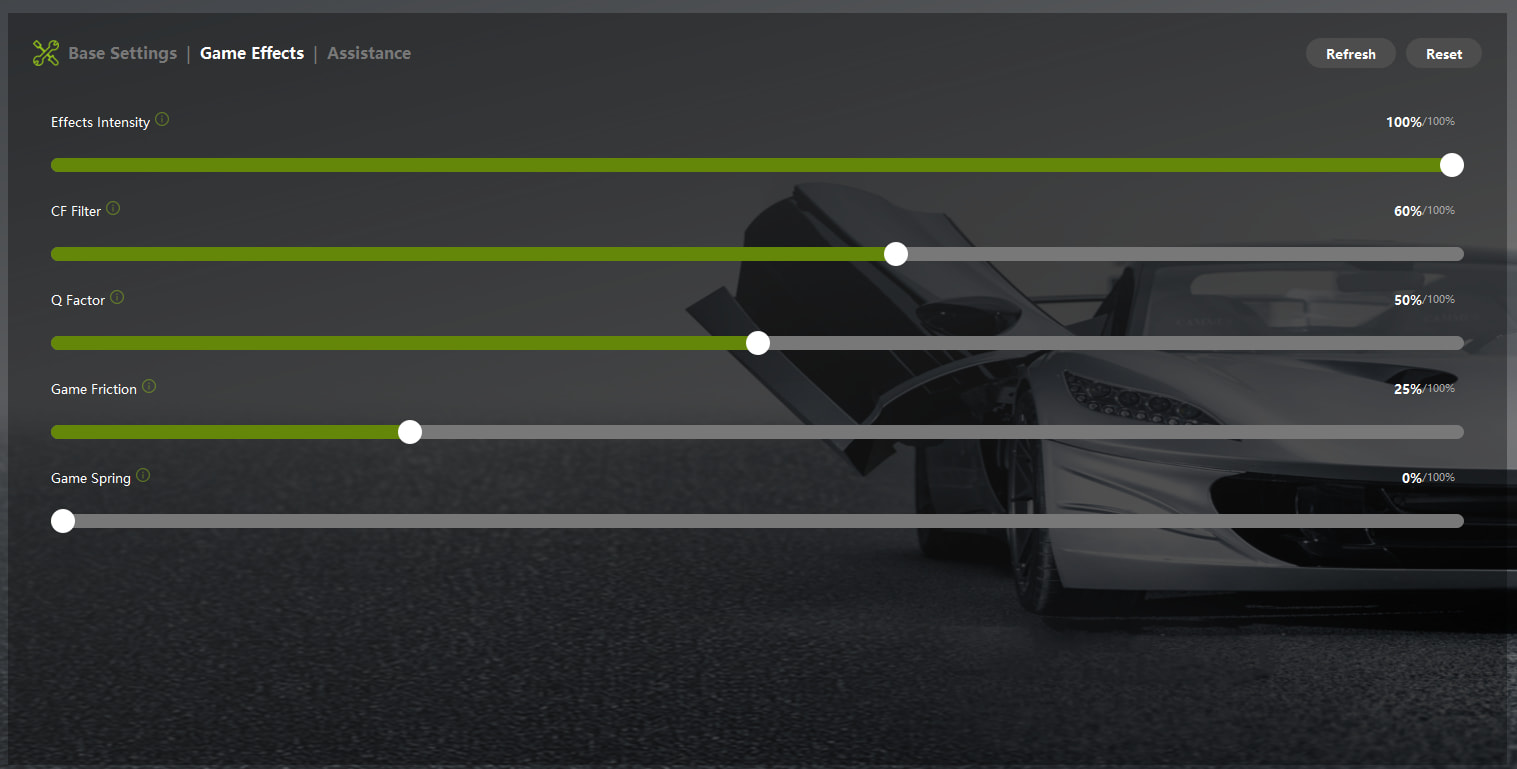
CF Filter 60%, Q Factor 70%. Enough filtering to remove high-frequency motor noise without losing the actual information. The 312T’s feedback is so raw that going lower than this just makes it unreadable. Going higher starts smoothing out the things you actually need to feel.

Game Friction 25%. Communicates front tyre load without making the wheel artificially heavier than the car already makes it. On a car this physical, less is more here.

In-game AC FFB:

Gain 60%. Calibrated so the hardest braking zones and fastest corners don’t clip. Below 55% and you start losing detail in lighter load phases. Above 65% and you’re clipping on the straight-line bumps.

Filter 0%. The 312T’s signal doesn’t need cleaning. It needs to be raw.

Kerb Effects 25%, Road Effects 35%. Monza’s kerbs are aggressive but you’re not riding them in this car, you’ll spin. Enough to feel them clearly as a warning. Road effects higher because the bumps and surface changes mid-corner are actual information you need to keep the car alive.

Slip Effects 5%. Just enough to feel the rear starting to go. A 1-second warning before the spin you’re about to have.

ABS Effects 0%. The 312T doesn’t have ABS. This setting is just noise.

End stop Hard. You need to know exactly where the lock limit is on a car with this much mechanical castor. No ambiguity.

This setup won’t be comfortable. That’s the point. If you want comfortable, drive something modern. If you want to understand why people called those drivers the best in the world, put 15Nm of torque through a 1975 F1 car with no driver aids and find out for yourself.

7 Likes

[AC EVO][C5] Lamborghini Huracán STO at the Nürburgring – by Tawsif_Ahnaf_Khan

Game: Assetto Corsa EVO | Device: Cammus C5 | Pedals: Cammus CP5

Car: Lamborghini Huracán STO | Track: Nürburgring GP

Cammus Base Settings:

Game Effects:

Assistance:

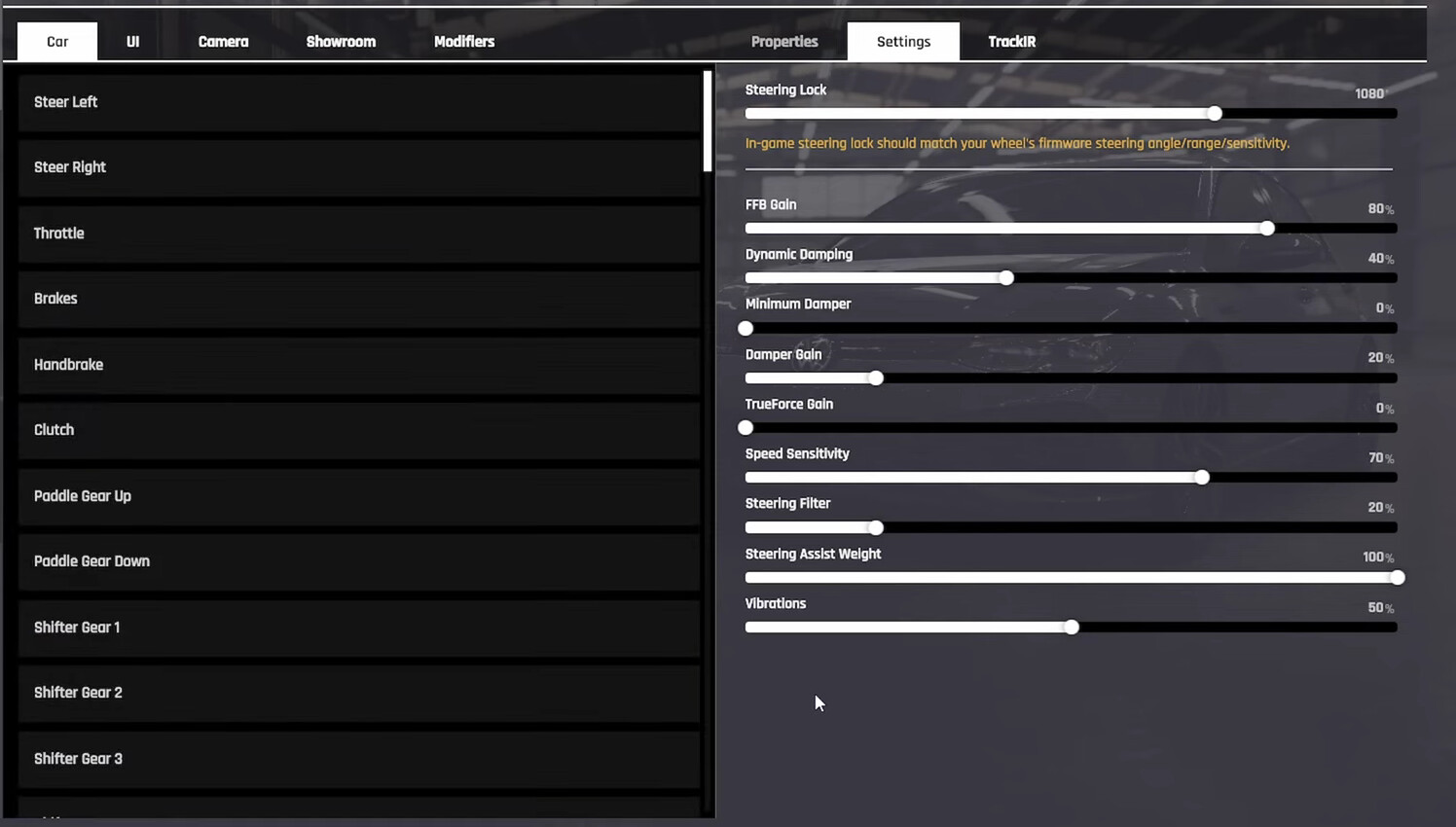
In-game AC EVO FFB:

I drive to and from school and work every day. by the time I get home the last thing I want is to fight my own equipment. I want to sit down, put some laps in and actually enjoy it. that’s the whole reason I got the C5. coming from a Thrustmaster T150 the difference in feel was enough that even a casual session actually means something now.

the Huracán STO in AC EVO is the perfect car for this kind of driving. it’s a road-legal track car with real aero and real brakes but it’s not trying to kill you. it rewards smooth inputs and punishes laziness without being so demanding that you can’t relax after a long day. the Nürburgring GP layout is tight and technical and just long enough that a good lap feels like an achievement without being a 7-minute ordeal.

power stays at 100% in the software and I control the strength through FFB gain in-game at 80%. cutting power in the firmware compresses your signal and kills fine detail. always keep it full in the app.

damping at 8% and friction at 5% because the C5 at full power can feel a little loose at low speed in AC EVO. small amounts of both give the wheel consistent weight without fighting the FFB signal. inertia and idle spring both zero because AC EVO already generates its own centering force and anything on top just gets in the way.

CF filter at 70% and Q factor at 65% because AC EVO’s road surface model is very detailed. at full filter you get noise that hides the load changes that actually matter. 70% keeps kerbs and mid-corner texture clear without drowning you in chatter.

game friction at 45% is what tells you the front is starting to push before understeer actually arrives. on the Huracán STO this is the most useful setting on the whole list.

dynamic damping at 40% is Kunos’ own reference value. it ties wheel weight to speed so steering gets heavier at pace and lighter through the slow stuff. speed sensitivity at 70% and steering filter at 20% work together to smooth out the character change between the technical sections and the faster sweeps without making the wheel feel disconnected. steering assist weight at 100% keeps the centering feeling natural through the whole lap.

the real reason I’m posting this. my friend has been watching me drive on the C5 since I upgraded from my T150, which he’s now using. His birthday is coming up and the dream is to win a second C5 and give it to him properly. if this helps even one person dial in their C5 in AC EVO and I get my friend into proper sim racing at the same time, that’s a win either way.

8 Likes

[AC][C12] Lotus Evora GX at Brands Hatch GP – by KevinRDM

Game Name: Assetto Corsa

Device Model: Cammus C12

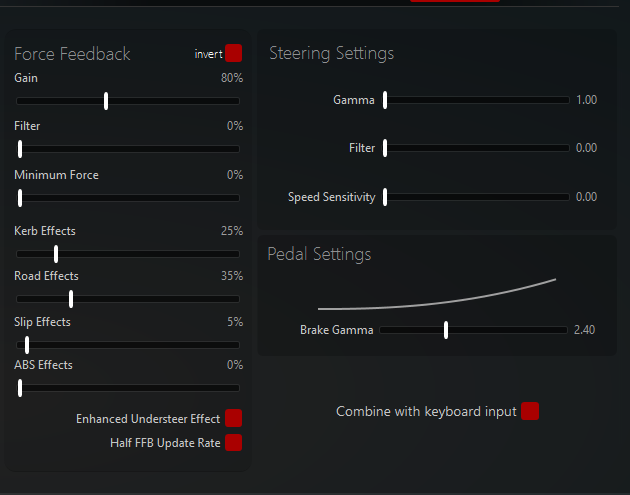
Base Parameter Screenshot:

In-game FFB Screenshot:

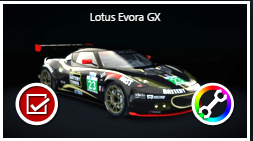
Recommended Vehicle / Car Category: GT — Lotus Evora GX
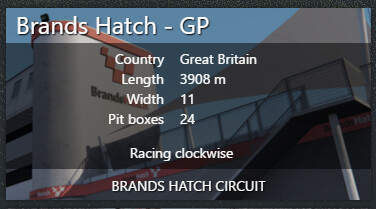
Recommended Track: Brands Hatch GP
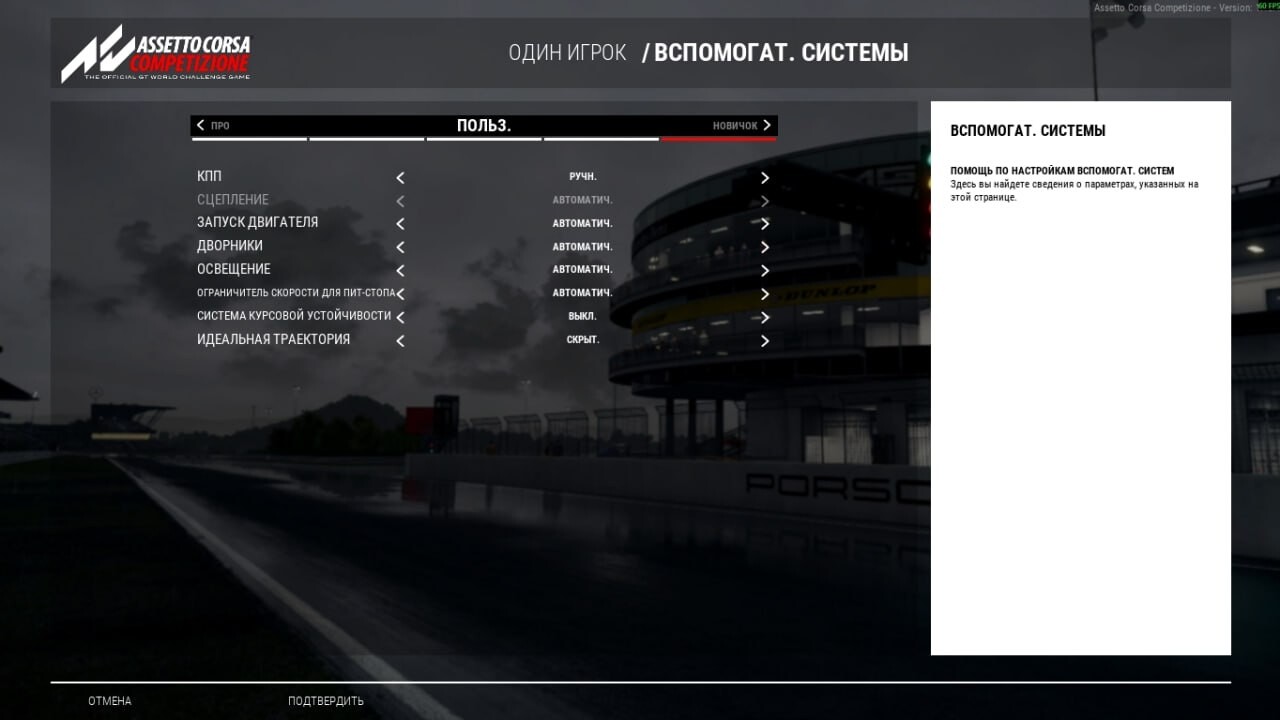
Why do you recommend these settings?

C12 owner here, running AC with the Lotus Evora GX at Brands Hatch. Took a while to get this dialled in properly so I’ll explain the thinking behind each value.

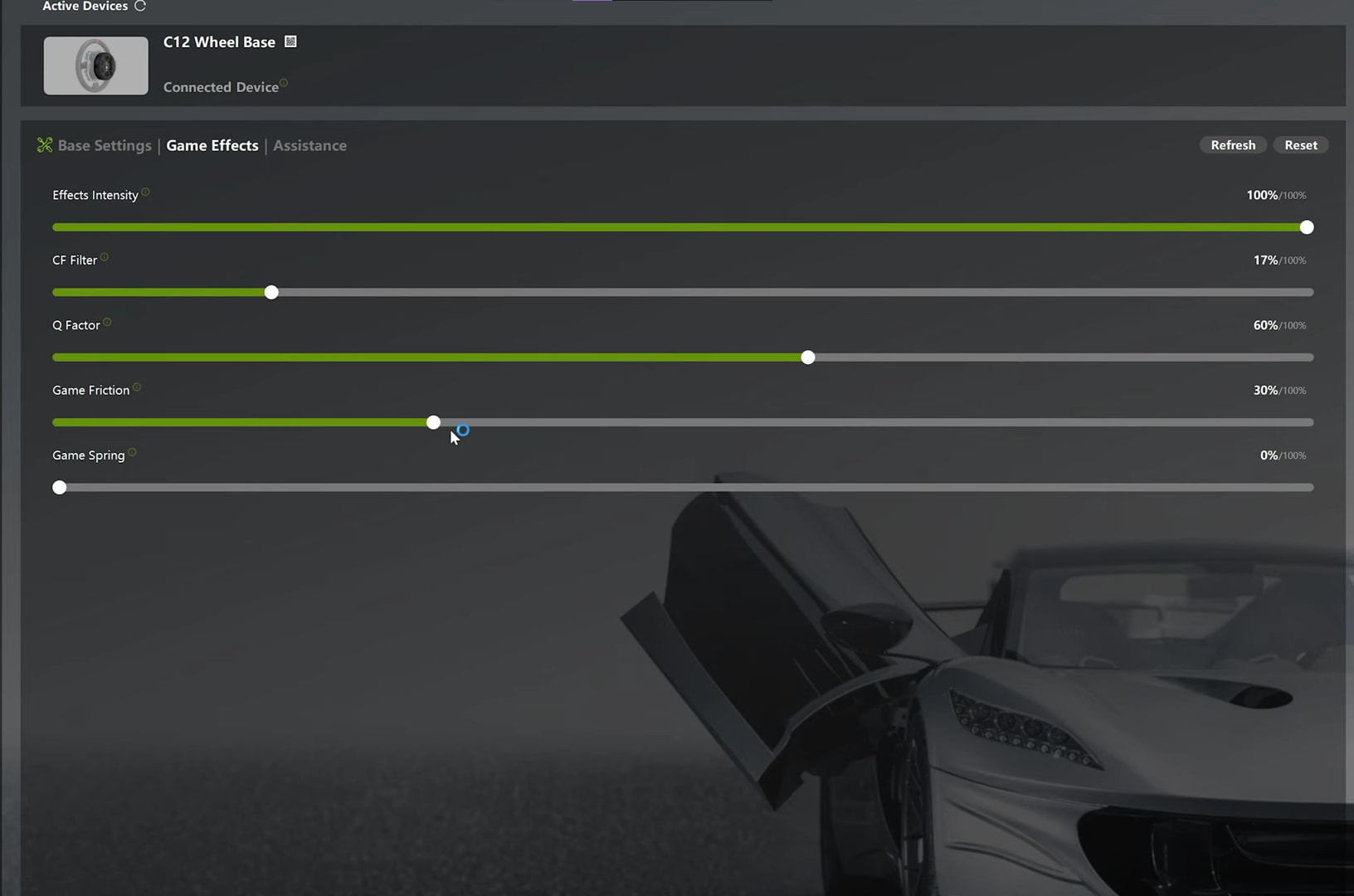
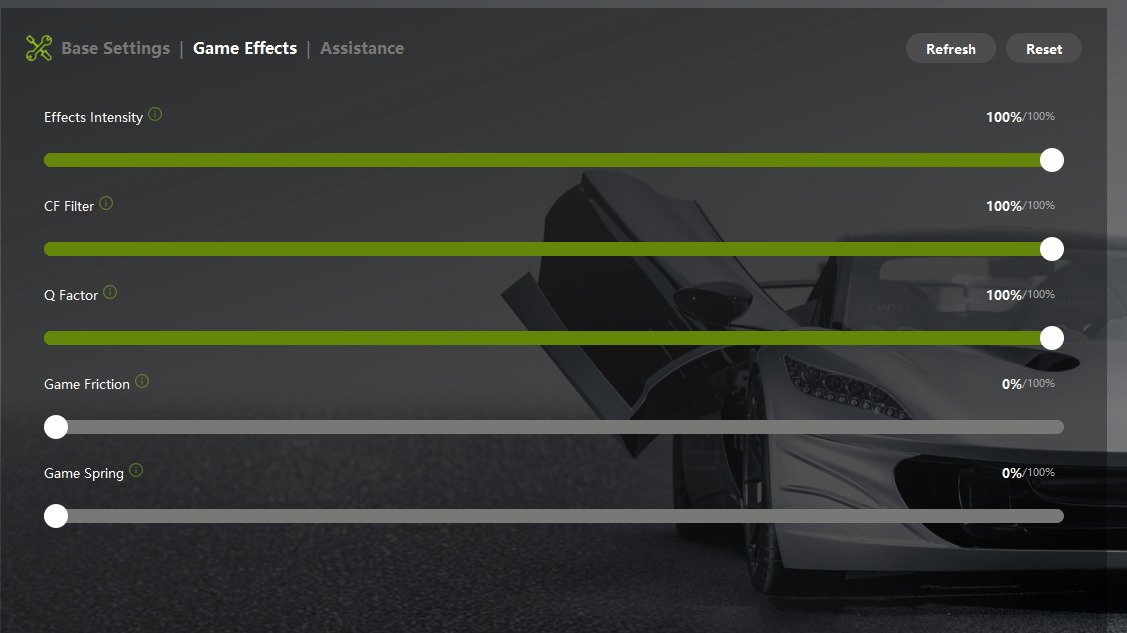
Game Effects (Cammus App):

Effects Intensity at 100% always. Dropping this just cuts headroom for everything else.

CF Filter at 17%. Most people run this way too high. Keeping it low lets through more road detail, bumps, kerbs, surface changes, all of it. Brands Hatch has a lot of elevation changes and tarmac variation so you actually want to feel that rather than filter it out.

Q Factor at 60%. This cleans up what comes through the CF Filter. 60% gives a readable signal without oscillation on the straights. Lower felt twitchy, higher started hiding what the tyres were doing.

Game Friction at 30%. This adds tyre load weight to the wheel, you feel the front loading into corners and going light under understeer. The Evora naturally pushes the front on corner exit and 30% makes that really obvious. Enough to be useful without fighting your steering.

Game Spring at 0%. The physics already centres the wheel, adding spring on top just interferes with the real FFB.

Assistance Tab:

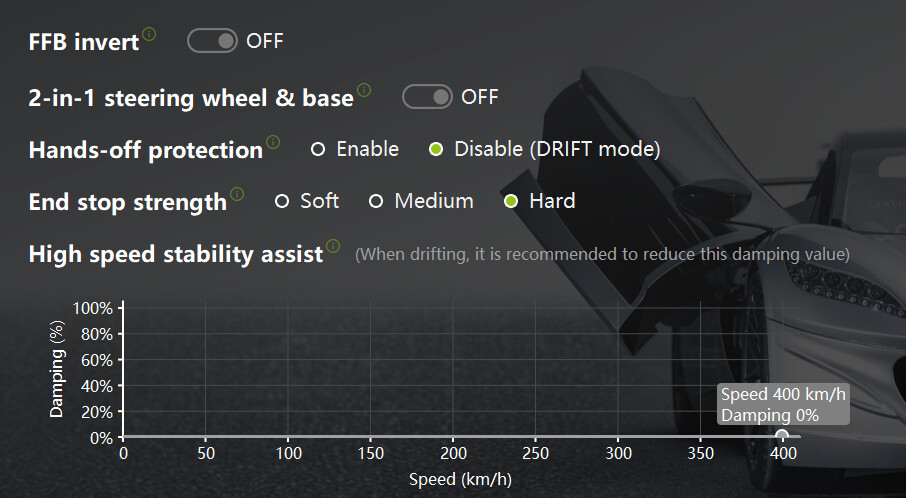
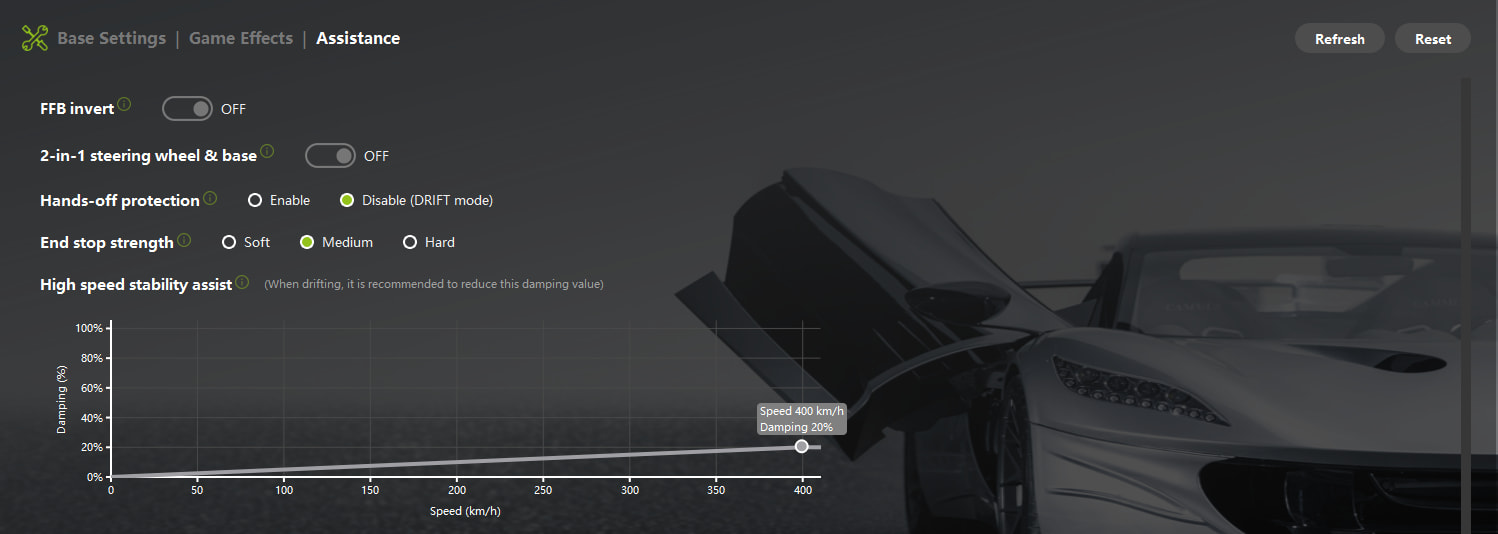
FFB Invert off. Hands-off protection disabled (Drift Mode) because if it cuts power mid-recovery after a kerb strike it can cost you the car. At a track like Brands with aggressive kerbs at Druids and Clearways you want full control at all times. End stop at Medium, soft was too vague and hard was too violent, medium gives a clear warning without the jolt. High speed stability assist set to 20% at 400km/h, at normal circuit speeds it’s basically not doing anything, just stops the wheel getting nervous on long flat sections.

In-Game FFB (Assetto Corsa):

Gain at 80%. Keeps enough headroom to avoid clipping through fast direction changes. Running 100% in the Cammus software and 80% in-game gives you the best range on the C12.

Filter at 0%. AC’s filter smooths the signal, at zero you get everything the physics is generating which is what you want for reading tyre state.

Minimum Force at 0%. The Evora generates enough real self-aligning torque, no need for an artificial floor.

Kerb Effects at 25%. Clear enough to feel the kerbs without drowning out the cornering information at the same time.

Road Effects at 35%. Brands Hatch’s surface has a lot of character especially through Paddock Hill and this lets you feel it properly.

Slip Effects at 5%. Just enough to hint at tyre slip. Any higher and it starts competing with the load feedback.

ABS Effects at 0%. Not running ABS so not relevant.

Enhanced Understeer Effect on. The Evora pushes the front on corner exit and this makes that moment obvious through the wheel, steering goes noticeably light when you’re scrubbing the fronts. Really useful for finding your trail braking limit.

Half FFB Update Rate on. Smooths out any harshness without losing real detail.

Brands Hatch is honestly one of the best tracks to tune FFB on because it has everything, a blind crest entry at Paddock Hill, a heavy braking hairpin at Druids, fast sweepers and tight infield sections. If settings work here they’ll work anywhere. The Evora is a good car to tune around too because it tells you exactly what’s happening with the tyres, it doesn’t hide anything. Hope someone finds this useful.

5 Likes